Article
+ UpdatedThe ReAct Framework Explained - An AI Reasoning-and-Acting Paradigm from Principles to Practice
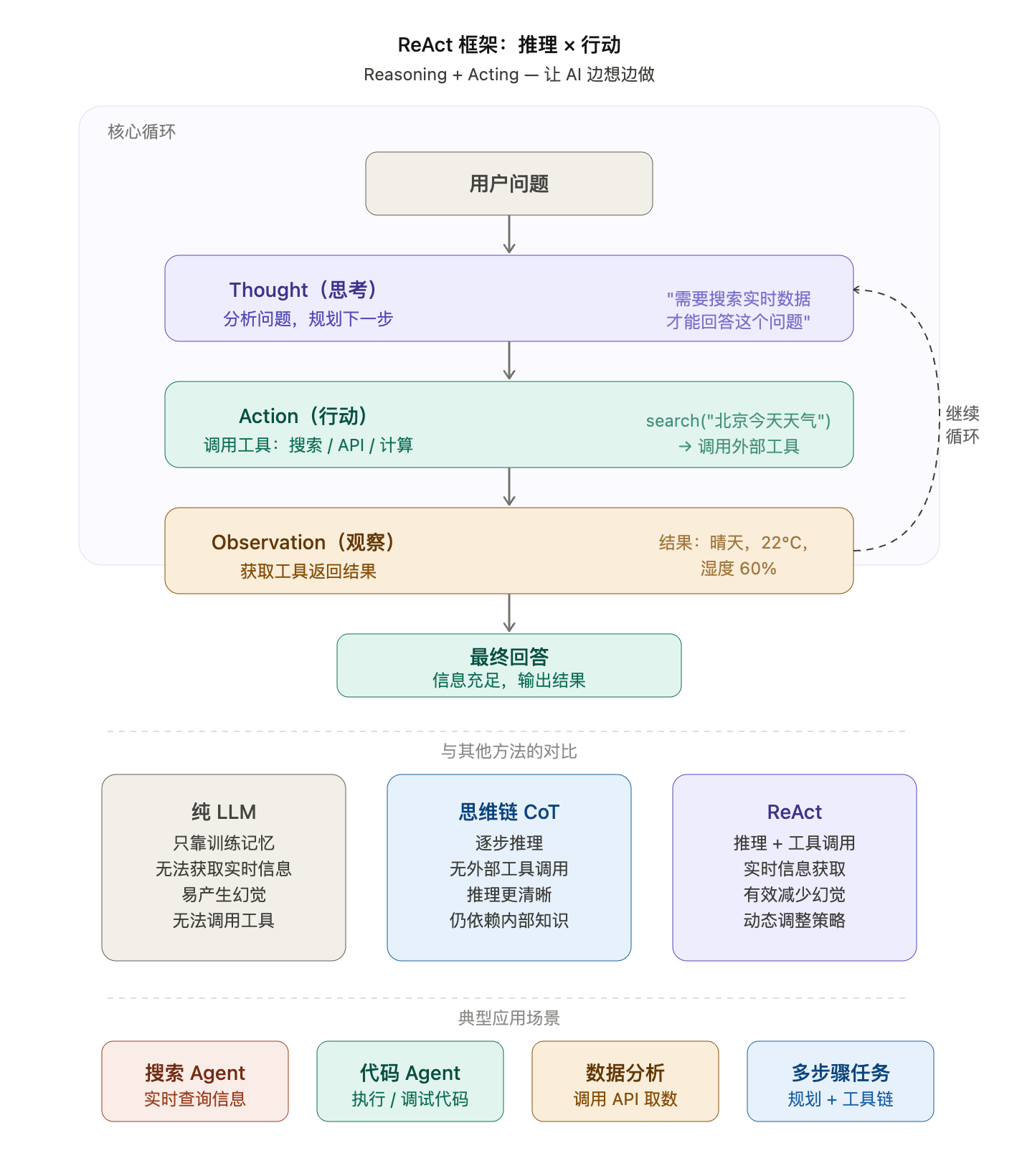
ReAct is an AI prompting paradigm/framework proposed by Google researchers in 2022 that combines Reasoning and Acting.
Before this, zero-shot, few-shot, and even CoT prompting patterns all relied purely on the prompt to answer directly, or on the examples the prompt provides to reason from. These approaches have some limitations; for example, they can't obtain real external information in real time and then think further, reason, and reach a conclusion on that basis. If you aren't yet familiar with the basic prompting content mentioned above, I recommend reading # Introduction to Prompt Engineering: A Comprehensive Look at Zero-Shot and Few-Shot Prompting
ReAct prompts LLMs to generate verbal reasoning traces and actions for a task. This lets the system perform dynamic reasoning to create, maintain, and adjust action plans, while also supporting interaction with external environments (for example, Wikipedia) to incorporate additional information into the reasoning.
Workflow
Each cycle of ReAct consists of three stages:
Thought → Action → Observation
PLAINTEXT
复制
Question: What's the weather in Beijing today?

Thought: I need to look up the real-time weather, so I should call the weather tool.
Action: search("Beijing weather today")
Observation: The result shows Beijing at 22°C and sunny.

Thought: I've got the answer and can reply to the user now.
Answer: It's sunny in Beijing today, around 22°C.
+
Hands-On Practice
1. Initializing the Model Client
PLAINTEXT
复制
"""
A real ReAct Agent
- LLM: DeepSeek-V4-Pro (thinking enabled)
- Search tool: Tavily (real web search)
- Calculation tool: Python eval (local execution)
Flow: Think → Act → Observe → Think → ... → Final answer
"""
import requests
import json
import os

from openai import OpenAI
from tavily import TavilyClient

# ─────────────────────────────────────────
# 1. Initialize the client
#    It's recommended to read the key from an environment variable to avoid leaking it by hard-coding
#    Run in the terminal:
#      export DEEPSEEK_API_KEY=sk-xxx
#      export TAVILY_API_KEY=tvly-xxx
# ─────────────────────────────────────────
client = OpenAI(
    api_key=os.environ.get("DEEPSEEK_API_KEY"),
    base_url="https://api.deepseek.com",
)
tavily_client = TavilyClient(api_key=os.environ.get("TAVILY_API_KEY"))

MODEL = "deepseek-v4-pro"
If you find environment variables a hassle, you can also temporarily hard-code the key information directly in the code.
2. Implementing the Tools
This mainly implements the tool functions the agent needs to call during execution, such as web search and math calculation.
PLAINTEXT
复制
# ─────────────────────────────────────────
# 2. Tool implementation
# ─────────────────────────────────────────
def search(query: str) -> str:
    """
    Tavily real web search
    Returns the title + summary + source of the top 3 results
    """
    response = tavily_client.search(
        query=query,
        max_results=3,
        search_depth="basic",  # basic saves tokens; advanced goes deeper
    )
    results = []
    for r in response.get("results", []):
        results.append(f"[{r['title']}]\n{r['content']}\nSource: {r['url']}")
    return "\n\n".join(results) if results else "No relevant results found"


def calculator(expression: str) -> str:
    """Local calculator, executes Python math expressions"""
    try:
        result = eval(expression)
        return f"Result: {result}"
    except Exception as e:
        return f"Calculation error: {e}"

def get_current_time() -> str:
    """
    Returns the current date and time
    """
    from datetime import datetime

    return f"Current time: {datetime.now().strftime('%Y-%m-%d %H:%M:%S')}"


def get_exchange_rate(base: str, target: str) -> str:
    """Real-time exchange rate lookup"""
    url = f"https://open.er-api.com/v6/latest/{base.upper()}"
    response = requests.get(url)
    data = response.json()

    rate = data["rates"].get(target.upper())

    if rate:
        return f"1 {base.upper()} = {rate} {target.upper()}"

    return f"No exchange rate found for {target}"

# Tool registry: name → function
TOOLS = {
    "search": search,
    "calculator": calculator,
    "get_current_time": get_current_time,
    "get_exchange_rate": get_exchange_rate,
}
3. Defining the Tool Schema
The Tool Schema is defined so the model knows which tools it can call.
PLAINTEXT
复制
# ─────────────────────────────────────────
# 3. Tool Schema (tells the model which tools are available)
# ─────────────────────────────────────────
TOOL_SCHEMAS = [
    {
        "type": "function",
        "function": {
            "name": "search",
            "description": "Search the web for real-time information, suited to looking up news, weather, people, events, the latest data, and so on",
            "parameters": {
                "type": "object",
                "properties": {
                    "query": {
                        "type": "string",
                        "description": "Search keywords, as specific as possible, such as \"2025 latest AI model rankings\"",
                    }
                },
                "required": ["query"],
            },
        },
    },
    {
        "type": "function",
        "function": {
            "name": "calculator",
            "description": "Perform a math calculation. Input a valid Python math expression",
            "parameters": {
                "type": "object",
                "properties": {
                    "expression": {
                        "type": "string",
                        "description": "Math expression, such as '3 * (12 + 5)' or '2 ** 10'",
                    }
                },
                "required": ["expression"],
            },
        },
    },
    {
        "type": "function",
        "function": {
            "name": "get_current_time",
            "description": "Get the current date and time, returned in year-month-day, hour:minute:second format",
            "parameters": {
                "type": "object",
                "properties": {},  # No parameters, left empty
            },
        },
    },
    {
        "type": "function",
        "function": {
            "name": "get_exchange_rate",
            "description": "Query the real-time exchange rate between two currencies, such as USD to CNY",
            "parameters": {
                "type": "object",
                "properties": {
                    "base": {
                        "type": "string",
                        "description": "Base currency code, such as USD, CNY, EUR",
                    },
                    "target": {
                        "type": "string",
                        "description": "Target currency code, such as CNY, USD, JPY",
                    },
                },
                "required": ["base", "target"],
            },
        },
    },
]
4. Wrapping the Model Call
Always add the thinking parameter, with stream=False
Streaming must be turned off inside the ReAct loop, otherwise tool_calls can't be parsed properly
PLAINTEXT
复制
# ─────────────────────────────────────────
# 4. Wrap the DeepSeek call
# ─────────────────────────────────────────
def call_model(messages: list) -> object:
    return client.chat.completions.create(
        model=MODEL,
        messages=messages,
        tools=TOOL_SCHEMAS,
        tool_choice="auto",
        reasoning_effort="high",
        extra_body={"thinking": {"type": "enabled"}},
        stream=False,
    )
5. The ReAct Main Loop
PLAINTEXT
复制
# ─────────────────────────────────────────
# 5. ReAct main loop
# ─────────────────────────────────────────
def run_agent(user_question: str, max_steps: int = 6):
    print(f"\n{'=' * 55}")
    print(f"Question: {user_question}")
    print(f"{'=' * 55}")

    # Conversation history, appended each round — this is the Agent's short-term memory
    messages = [
        {
            "role": "system",
            "content": (
                "Before answering, first judge whether a tool is needed to get information. "
                "When needed, call a tool and, after getting the result, give the final answer by synthesizing it. "
                "If the question can be answered directly, there is no need to call a tool. "
                "Please answer in English."
            ),
        },
        {"role": "user", "content": user_question},
    ]

    for step in range(max_steps):
        print(f"\n── Step {step + 1} ──────────────────────────────")

        # ① THINK: call the model and let it decide the next step
        response = call_model(messages)
        msg = response.choices[0].message

        # If thinking is enabled, print the model's reasoning process (optional, for debugging)
        if hasattr(msg, "reasoning_content") and msg.reasoning_content:
            preview = msg.reasoning_content[:150].replace("\n", " ")
            print(f"[THINK]   {preview}...")

        if msg.tool_calls:
            # ② ACT: the model decides to call a tool
            messages.append(msg)  # Save the model's decision into the history

            for tool_call in msg.tool_calls:
                fn_name = tool_call.function.name
                fn_args = json.loads(tool_call.function.arguments)

                print(f"[ACT]     Tool: {fn_name}")
                print(f"          Arguments: {fn_args}")

                # ③ OBSERVE: run the tool and get the real result
                if fn_name in TOOLS:
                    result = TOOLS[fn_name](**fn_args)
                else:
                    result = f"Tool {fn_name} does not exist"

                # Only print the first 200 characters to avoid flooding the screen
                preview = result[:200] + "..." if len(result) > 200 else result
                print(f"[OBSERVE] {preview}")

                # Append the tool result to the history; the model will see it in the next round
                messages.append(
                    {"role": "tool", "tool_call_id": tool_call.id, "content": result}
                )

        else:
            # The model thinks it has enough information and gives the final answer directly
            print(f"\n[Final answer]\n{msg.content}")
            return msg.content

    print("\n[Maximum steps reached, forcibly ended]")
    return "Reached the maximum number of reasoning steps without completing the task."
6. Test Run
PLAINTEXT
复制
# ─────────────────────────────────────────
# 6. Test run
# ─────────────────────────────────────────
if __name__ == "__main__":
    # Test 1: needs a real search
    # run_agent("What's the weather like today in Zhijin County, Bijie City, Guizhou Province?")

    # Test 2: search + calculation combined
    # run_agent("What's Tesla's stock price today? If I buy 100 shares, how many US dollars would I need?")

    # Test 3: answer directly, no tool needed
    # run_agent("Explain in one sentence what a ReAct Agent is")

    # Test 4: current time
    # run_agent("Current Beijing time")

    # Test 5: exchange rate test
    run_agent("How many Chinese yuan can 1000 US dollars get right now?")
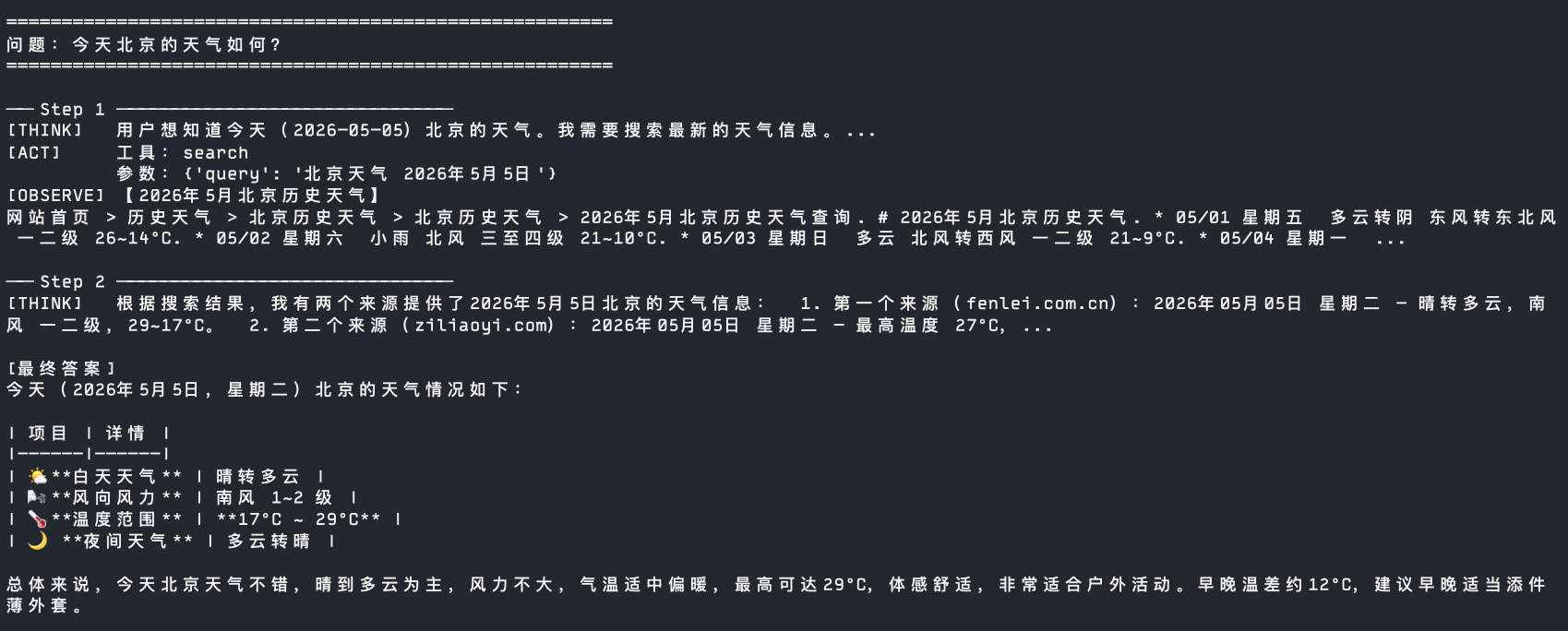
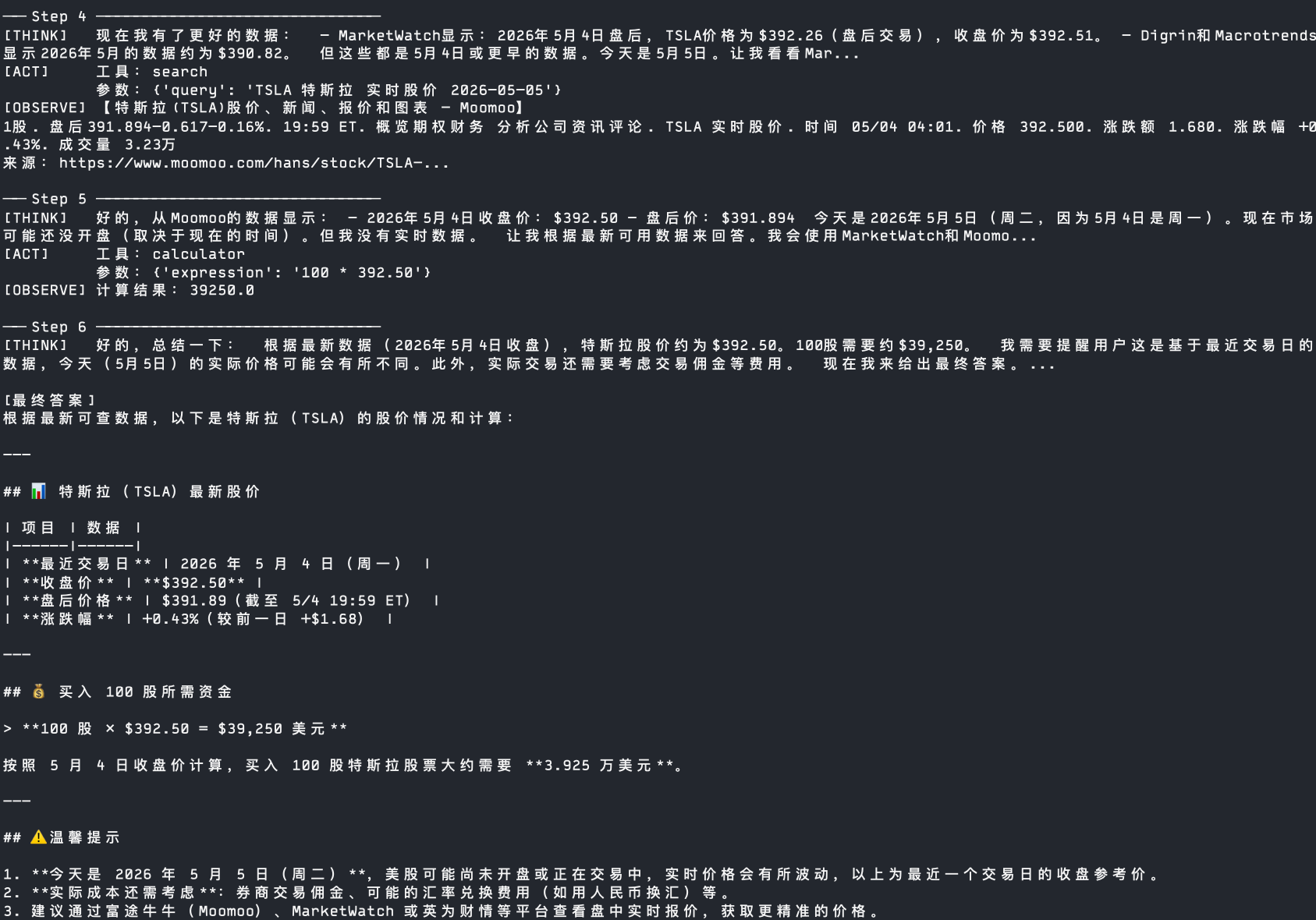
Sample Run Results (Partial)
+
+

+
Copyright
Copyright of this article belongs to its author or rights holder. When reposting or quoting, please follow the applicable license terms and keep the link to this article.
Link to this article: https://xuyi.dev/en/2026-05-05-kpewur