Article
+ UpdatedBlog Notes - Adding an "Updated" Badge to Blog Posts
+
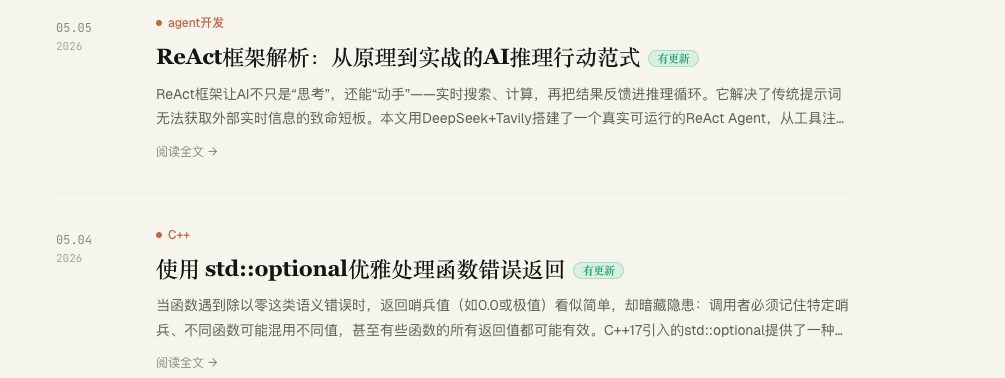
Some articles don't end once they're written.
Especially technical, tool, and experience articles: look back after a while and you often find that some judgments are outdated, some practices have changed, and some pitfalls have since been worked around. If you just quietly edit it, readers can't tell the article has changed; if you publish a new post every time, that feels too heavy.
So I wanted to add a very small feature to the blog: when an article has been updated after publishing, show a green "Updated" badge in the list. After entering the article, you can also see roughly what was adjusted in this update.
This sounds simple, but in building it I found it actually tests a blog system's sense of proportion quite a bit.
The Initial Idea
What I wanted at first was a very light hint.
In the article list, an extra small green tag next to the title. When readers scan the list, they can tell: something was added to this article later.
On the article detail page, put an update notice card at the start of the body, telling readers the update time and roughly which content was added, adjusted, or removed.
The advantage of this approach is restraint. It doesn't change the reading rhythm of the article itself, nor does it turn the blog into a code review page.
Version 1: A Lightweight Update Card
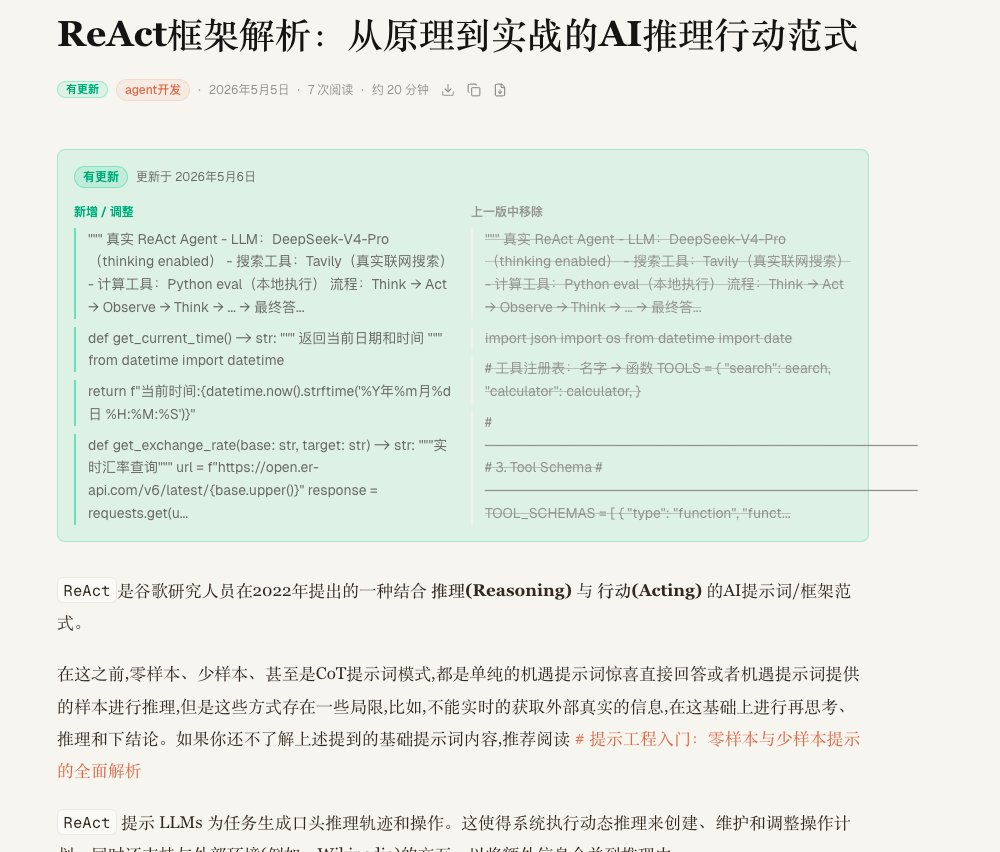
The first version was very straightforward.
The data layer gets a few new fields:
content_updated_at: the time of the most recent update to the bodyprevious_content: a plain-text snapshot from before the updateprevious_html: an HTML snapshot from before the update
When the body of an already-published article changes, the system records a snapshot of the content before the first change and updates content_updated_at. The list page only needs to check:
PLAINTEXT
复制
content_updated_at > published_at
If it holds, show "Updated".
The article page uses previous_content and the current content for a simple paragraph-level comparison, extracts the added and removed paragraphs, and shows them in an update card in front of the body.
This version suits a blog well. It's not the most precise, but it's natural enough.
An Intermediate Attempt: In-Body Diff
Later I tried a more "precise" version: like a code diff, inserting the changes directly at the corresponding positions in the body.
Added content is prefixed with +, deleted content with -, and D and U mark before and after an update. Technically, it splits the previous HTML and the current HTML into block-level nodes, then aligns them in an LCS-like way, trying to find where the changes happened.
This version was feasible in engineering terms, but in experience it quickly exposed a problem: it interrupts reading too much.
Blog articles are different from code. Code is naturally reviewed line by line, while articles are read continuously. Inserting diff markers into the body shifts the reader's attention from "reading the article" to "reviewing the changes".
That doesn't fit the temperament of a blog.
Another Attempt: GitHub-Style Diff
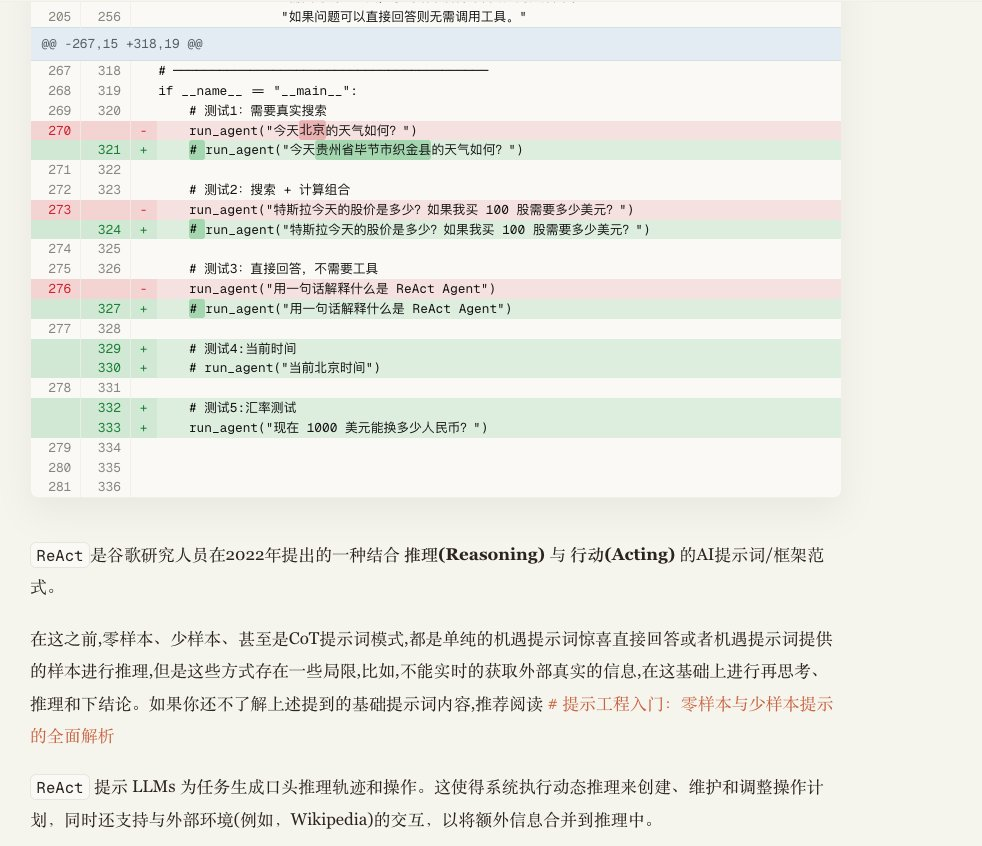
I then tried a more complete GitHub diff style: file header, hunks, left and right line numbers, a +/- gutter, and inline word-level highlighting.
Technically more complete, and more like a real diff. It first splits the content into lines, uses the longest common subsequence to find the identical and changed regions, and then shows only the context near the changes. Inside replaced lines it runs a word-level diff once more, making added and deleted words more obvious.
But in the end I took it out.
The reason is simple: it feels too much like a developer tool rather than part of a blog article.
If this feature were for the backend editor, it would be great; but placed in the front-end reading path for readers, it comes across as too intrusive.
The Final Approach: Back to a Light Hint
In the end I went back to the first version.
The list page shows only a green "Updated" badge. The article page shows only a gentle update card at the start:
Which day it was updated
What was added / adjusted
What was removed from the previous version
The body stays the body, and the update note stays a note.
This approach isn't as precise as a GitHub diff, but it fits the blog better. Readers can first learn that the article has changed, then decide whether to pay attention to the specific changes; and if they just want to read normally, they won't be interrupted.
A Few Technical Trade-offs
Several details here are fairly important.
Don't overwrite the previous snapshot on every autosave.
If a published article is autosaved every few keystrokes while editing, and the system refreshes previous_content each time, then what ends up being compared is just the changes of the last few seconds, which is completely meaningless.
So the current logic is: at the first body change after publishing, save the "pre-edit version" as the snapshot; as editing continues afterward, only update content_updated_at, without repeatedly overwriting this comparison baseline.
Only body changes count as "Updated".
Changes to metadata such as the title, category, cover, and pinned status shouldn't make an article show "Updated". What readers care about is whether the body content has changed.
List queries should be light.
The list page doesn't need to fetch previous_content and previous_html, only content_updated_at. Only when actually entering the detail page are the full fields read to generate the update note.
Updated 2.0
Today I made a simple adjustment to the blog's "Updated" feature.
The earlier update hint decided whether to show the "Updated" badge on the article list page based on content changes. What it expresses is "this article has been updated since it was published", not "there is an unread update for the current reader". Without a disappearing condition, it really would gradually lose its information value.
So I thought about it and turned it into unread update logic. A simple way to implement this logic is:
Treat each article's content_updated_at as its update version number.
After a user enters the article detail page, record it locally:
TYPESCRIPT
复制
post:updateSeen:{slug} = content_updated_atChange the condition for the list page to show "Updated" to:
TYPESCRIPT
复制
content_updated_at > published_at && the locally recorded seenUpdatedAt < content_updated_atSo:
v1 published, no badge
Updated to v2, the list shows "Updated"
After the user opens v2, the local record marks it read and the badge disappears
Later updated to v3, content_updated_at grows larger, and the badge reappears
This solves the problem where, having seen v2, you can't tell at v3 whether the badge is an old one.
+
+
Copyright
Copyright of this article belongs to its author or rights holder. When reposting or quoting, please follow the applicable license terms and keep the link to this article.
Link to this article: https://xuyi.dev/en/2026-05-06-kqdi7x