Article
+ UpdatedRAG Explained - How to Make AI Reason Precisely Over a Private Knowledge Base
Earlier articles have mentioned various prompting paradigms many times, such as zero-shot, few-shot, CoT, and so on. Using these techniques sensibly can, to some extent, improve how efficiently we use AI, but the conclusions the AI gives at that point are still based on its own training data. So is there a way to let AI think, reason, and retrieve on top of external data such as our own documents and knowledge bases, and arrive at results closer to the facts?
The answer is RAG.
RAG (Retrieval-Augmented Generation) is one of the most central and most commonly used techniques in current Agent development, and almost every production-grade Agent uses it. So if you're learning agent development, RAG is a stop you almost can't bypass.
Basic Concepts
Researchers at Meta AI introduced a method called Retrieval Augmented Generation (RAG) to handle this kind of knowledge-intensive task. RAG combines an information retrieval component with a text generation model. RAG can be fine-tuned, and its internal knowledge can be modified efficiently, without retraining the whole model.
Simply put, RAG lets a large model look something up before answering the user's question, and then generate the final answer based on what it found.
This addresses problems of a pure LLM such as hallucination and knowledge cutoff dates.
Hallucination is easy to understand: the answer the model gives looks perfectly serious, but is quite possibly serious nonsense, making things up out of thin air. That is hallucination.
The knowledge cutoff date may be something ordinary people hear less about; it is really the timeliness of the training data. After each LLM is trained, all of its answers are based on that training data, and once training is done, the model no longer knows about anything that happened afterward.
In other words, unlike a human, who can look things up or ask others about what we don't know, the model can't, and that is exactly the purpose of RAG.
Basic Flow
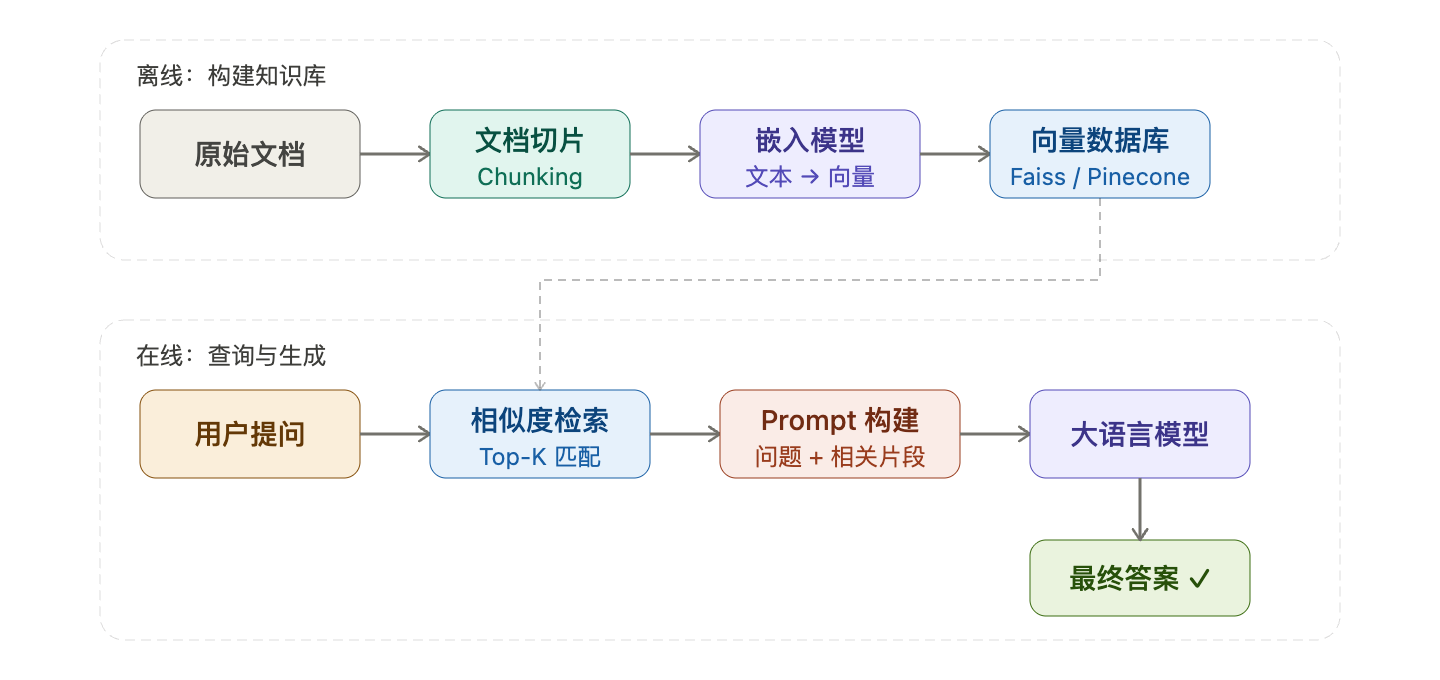
Knowledge base construction: documents are first cut into small chunks, each chunk is converted into a vector by an embedding model, and stored in a vector database. This process only needs to be done once, and afterwards updating knowledge only requires running it again.
Query generation: the user's question is likewise vectorized, a similarity search is run in the database, the
Top-kmost relevant chunks are pulled out and stitched into theprompt, and it's then handed to the large model to generate the final answer.
Enterprise internal knowledge-base Q&A (HR, product manuals), legal and medical document retrieval, customer-service bots, Q&A systems based on the latest news: for any scenario where "the knowledge volume is large, updates are frequent, and answers need to be traceable", RAG is the first choice.
Classification
RAG can be classified along many dimensions; here we mainly look at classification by architectural paradigm.
+
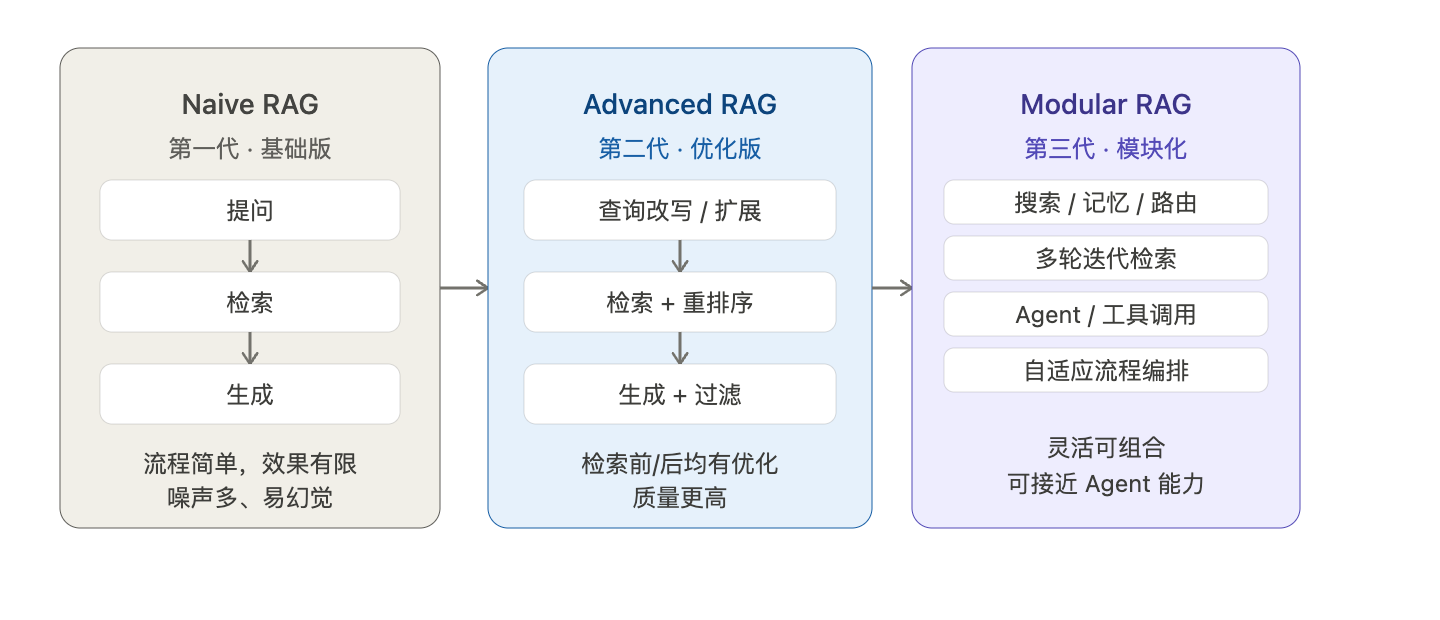
First-generation Naive RAG is the most basic "ask → retrieve → generate". It's simple to implement but has many problems: the retrieved content may be noisy and not relevant enough to the question, leading to poor generation quality.
Second-generation Advanced RAG optimizes both ends: before retrieval it rewrites the query (turning a vague question into a precise one), and after retrieval it re-ranks the results (putting the most relevant chunks first), so quality improves noticeably.
Third-generation Modular RAG splits each stage into an independent module that can be freely combined, and even brings in Agent capabilities, letting the model itself decide whether to retrieve, how many times, and with what tools. It has the highest flexibility and is closest to a true agent.
Basic Hands-On
Now for the hands-on part. We won't use LangChain for now, and will continue with pure Python to add a RAG tool to the Agent in the project we created when studying # ReAct Framework Explained: An AI Reasoning-and-Acting Paradigm from Principles to Practice.
In this hands-on exercise, we'll use RAG to read a local file named
docs.txt; this file serves as the external knowledge base and will hold some text content.
PLAINTEXT
复制
Muyu Technology is a tech company focused on artificial intelligence and software development, and its co-founders are Boss Xu and Boss Zou.

Muyu Technology's main product is welight, priced at $99, supporting the Windows and Mac platforms.

welight is the core product of Muyu Technology, mainly aimed at enterprise users, providing intelligent solutions.
1. Install and Import the Required Modules
PLAINTEXT
复制
# Install the RAG toolset
pip3 install chromadb sentence-transformers
A quick introduction:
chromadb is a lightweight, local vector database, similar to an open-source version of
Pinecone.It is designed specifically for storing high-dimensional vectors (Embeddings) and the corresponding original text.
Supports similarity search (cosine similarity, Euclidean distance, etc.)
Pros: easy to install, zero configuration, fast, suited to local development and small-to-medium projects
Cons: for large-scale production environments, consider switching to Milvus / Weaviate / PGVector
sentence-transformers is a classic library maintained by Hugging Face, containing a large number of pretrained Embedding models (such as all-MiniLM-L6-v2, bge-small-zh-v1.5, etc.)
It can convert a sentence or a piece of text into a fixed-dimension vector, such as 384 dimensions
PLAINTEXT
复制
# Import modules
import chromadb
from sentence_transformers import SentenceTransformer
2. Initialize RAG
PLAINTEXT
复制
# ─────────────────────────────────────────
# RAG initialization
# ─────────────────────────────────────────
embedding_model = SentenceTransformer("all-MiniLM-L6-v2")
chroma_client = chromadb.Client()
collection = chroma_client.create_collection("my_docs")

# Read the local docs.txt
with open("docs.txt", "r", encoding="utf-8") as f:
    content = f.read()

# Split by paragraph (separated by blank lines), filtering out empty paragraphs
documents = [p.strip() for p in content.split("\n\n") if p.strip()]

# Vectorize and store in ChromaDB
embeddings = embedding_model.encode(documents).tolist()
collection.add(
    documents=documents,
    embeddings=embeddings,
    ids=[f"doc{i}" for i in range(len(documents))]
)

print(f"Loaded {len(documents)} document chunks")
It's recommended to place this below the model client initialization.
3. Tool Function + Registration + Schema
PLAINTEXT
复制
def query_local_docs(question: str) -> str:
    """Retrieve the content most relevant to the question from the local document store"""
    query_embedding = embedding_model.encode([question]).tolist()
    results = collection.query(
        query_embeddings=query_embedding,
        n_results=2  # Return the 2 most relevant
    )
    docs = results["documents"][0]
    return "\n".join(docs) if docs else "No relevant content found in the local documents"


# Add to TOOLS
TOOLS = {
    "search": search,
    "calculator": calculator,
    "get_current_time": get_current_time,
    "get_exchange_rate": get_exchange_rate,
    "query_local_docs": query_local_docs,  # Newly added
}

# Add to TOOL_SCHEMAS
{
    "type": "function",
    "function": {
        "name": "query_local_docs",
        "description": "Query information in local private documents, suitable for looking up internal materials, product docs, private knowledge bases, etc.",
        "parameters": {
            "type": "object",
            "properties": {
                "question": {
                    "type": "string",
                    "description": "The question or keywords to query"
                }
            },
            "required": ["question"]
        }
    }
}
Testing
PLAINTEXT
复制
run_agent("What does Muyu Technology do?")
Since our project previously gained a real web search feature, to better experience the RAG process, it's worth adding a few lines of prompt to the message in the main loop code:
PLAINTEXT
复制
 messages = [
        {
            "role": "system",
            "content": (
                # f"You are an intelligent assistant. Today's date is {date.today()}. "
                "When answering questions, prefer using query_local_docs to query the local documents. "  # Add this line
                "If the local documents already contain enough information, answer directly from them without searching the web again. "  # Add this line
                "Only use search for a web search when the local documents have no relevant information. "  # Add this line
                "Before answering, first judge whether a tool is needed to get information. "
                "When needed, call a tool and, after getting the result, give the final answer by synthesizing it. "
                "If the question can be answered directly, there is no need to call a tool. "
                "Please answer in English."
            ),
        },
        {"role": "user", "content": user_question},
    ]
+
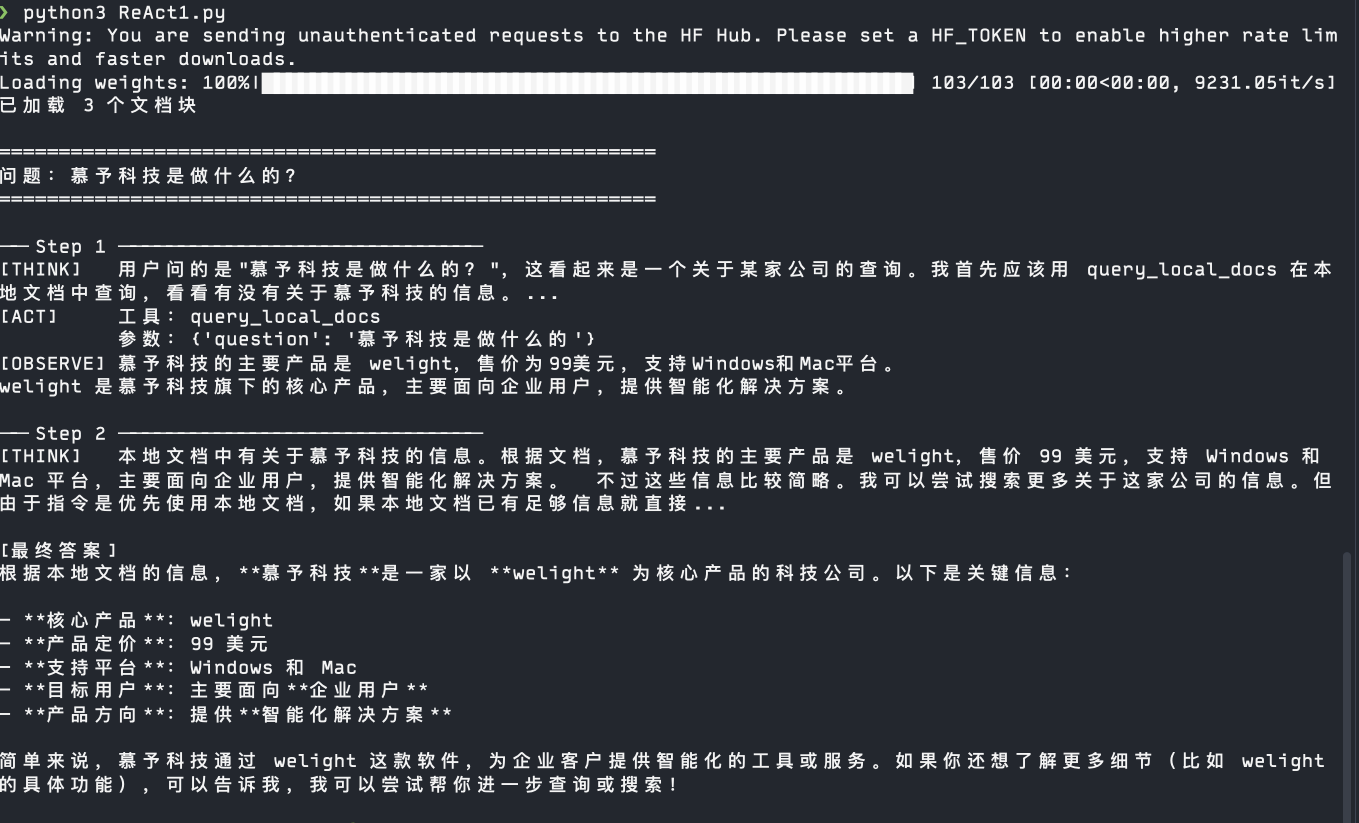
On the first run it will download the embedding model (about 90MB), so you'll need to wait a while.
+
Copyright
Copyright of this article belongs to its author or rights holder. When reposting or quoting, please follow the applicable license terms and keep the link to this article.
Link to this article: https://xuyi.dev/en/2026-05-07-kl_vsf