Article
A Deep Dive into LangChain and LangGraph - A Hands-On Analysis Through the PenFlow Project
This article takes the PenFlow (WeChat Official Account content assistant) project as its thread and, together with real code, systematically explains the core concepts of LangChain and LangGraph.
1. Overall Architecture at a Glance
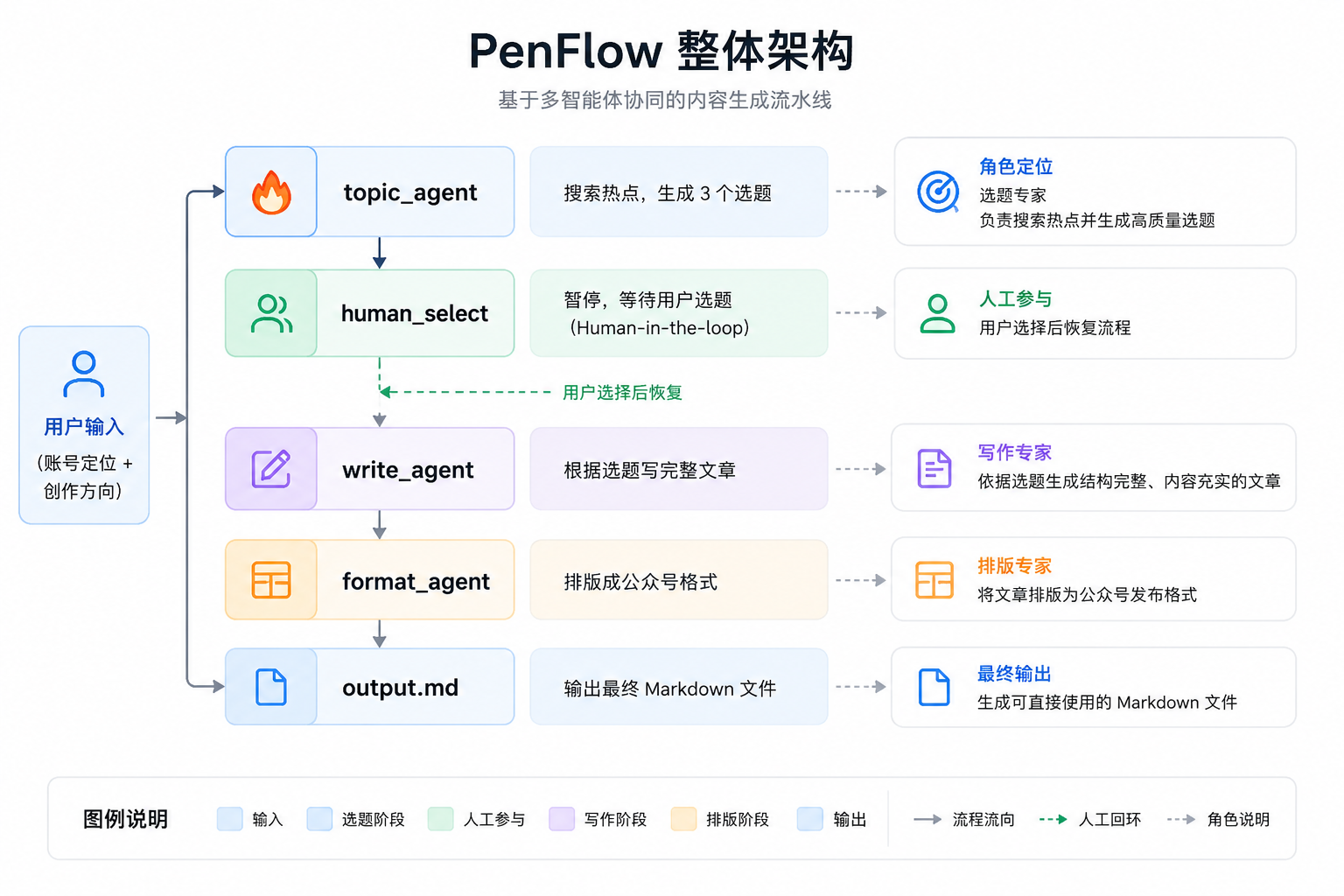
PenFlow is a multi-Agent collaborative content creation system. The current version is not a production-grade project; it is mainly used as a learning project for Agent development, a Demo-level Agent. The overall architecture is as follows:
Tech stack layers:
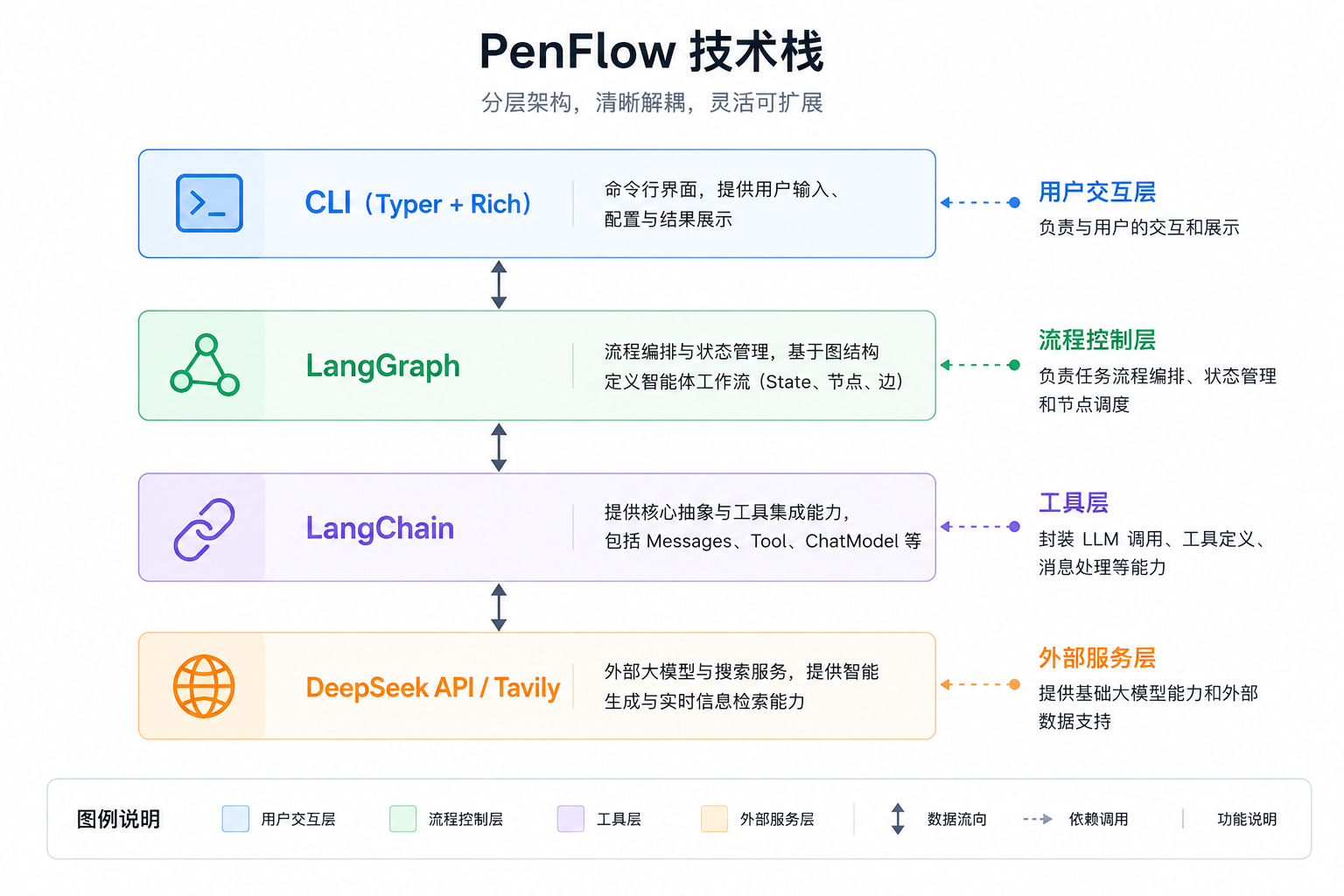
LangChain vs. LangGraph in one sentence:
LangChain = toolbox (provides parts like Messages, Tool, ChatModel)
LangGraph = pipeline controller (decides in what order and under what conditions the parts are assembled and run)
2. LangChain Core Concepts
2.1 The Messages System
LangChain abstracts all conversation content into Message objects, with different types for different roles:
from langchain_core.messages import SystemMessage, HumanMessage, AIMessage, ToolMessage
Type | Role | Purpose |
|---|---|---|
| system | Sets the AI's identity and behavior rules |
| user | The user's input |
| assistant | The model's reply (may contain tool_calls) |
| tool | Tool execution result, passed back to the model |
Usage in PenFlow (topic.py):
messages = [
    SystemMessage(content=system_prompt),      # Tell the model: you are a topic planner
    HumanMessage(content="Please recommend 3 topics...")   # The user's request
]
response = llm_with_tools.invoke(messages)
# response is an AIMessage, which may contain tool_calls (calling the search tool)
The full lifecycle of the message flow:
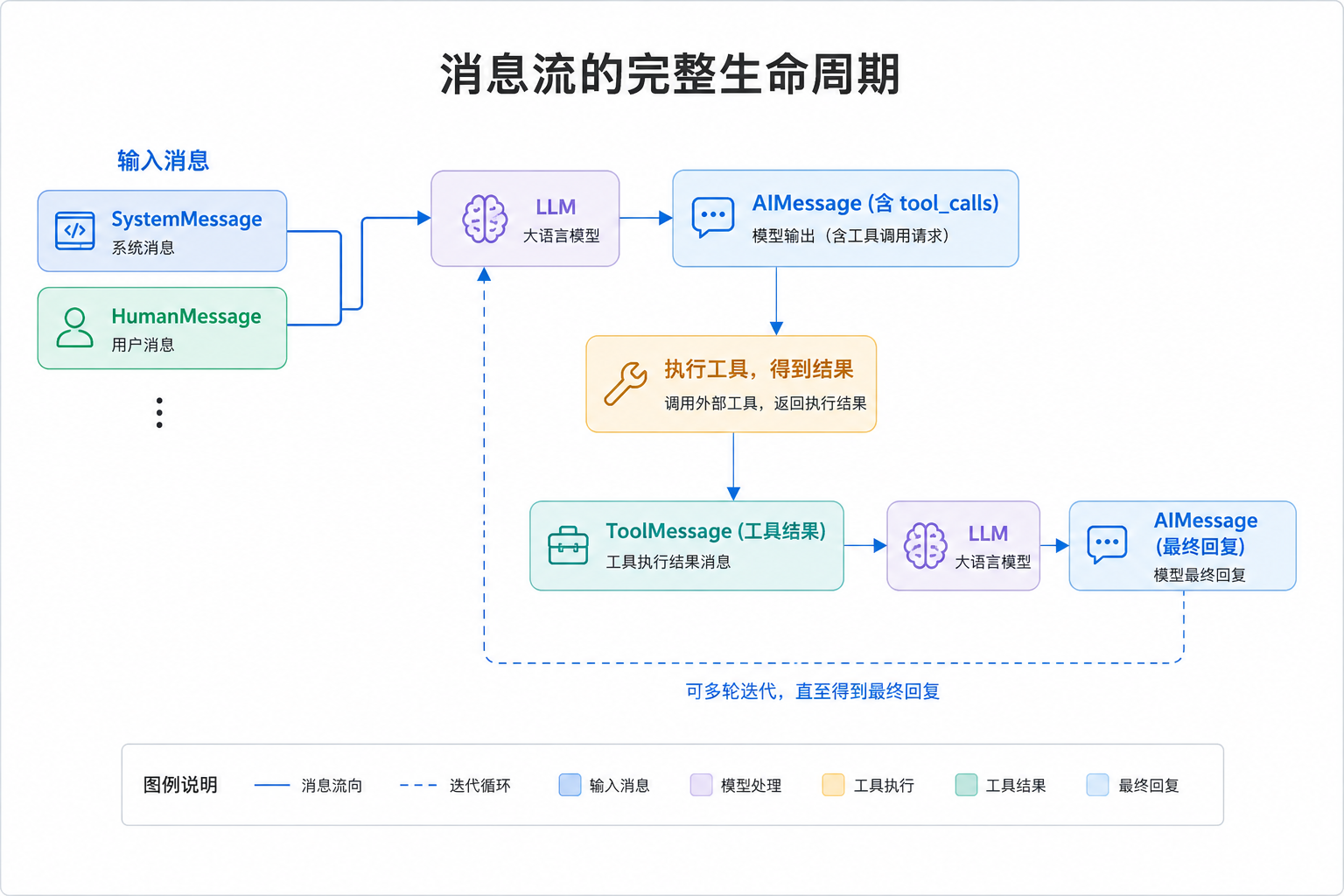
Why use Message objects instead of plain strings?
Because the LLM API needs to distinguish content from different roles. Once everything is unified into Message objects, the framework can automatically serialize it into the format the API needs, and you don't have to assemble JSON by hand.
2.2 ChatModel and bind_tools
ChatModel is LangChain's unified abstraction over all LLMs. PenFlow uses ChatOpenAI to connect to DeepSeek:
from langchain_openai import ChatOpenAI

llm = ChatOpenAI(
    model="deepseek-v4-pro",
    api_key=deepseek_key,
    base_url="https://api.deepseek.com",   # Replace base_url to connect any OpenAI-compatible model
    temperature=0.7,
    extra_body={"thinking": {"type": "disabled"}},  # DeepSeek-specific parameter
)
bind_tools: binding tool capability to the model
llm_with_tools = llm.bind_tools([search_tool])
What does bind_tools do? It injects the tool descriptions (name, parameter format) into every API call, letting the model know "I can call these tools".
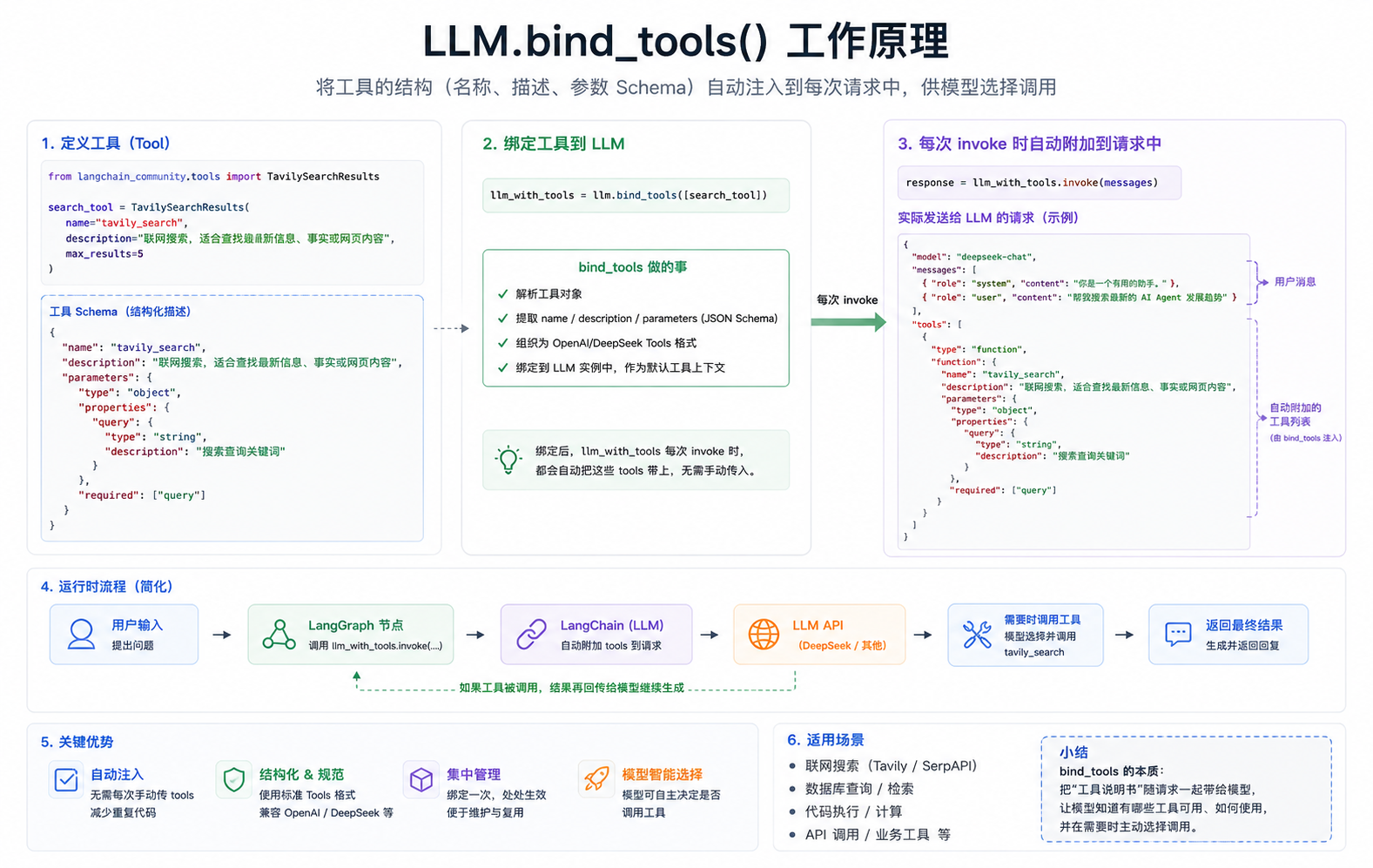
The difference between the two LLM instances:
llm              # Plain model, used for writing and formatting (no tools needed)
llm_with_tools   # Model bound to the search tool, used for topic selection (needs internet access)
Key design principle: Different Agents bind different tools, so each Agent can only call the tools within its own responsibility, preventing the model from "misusing" tools.
2.3 Tool
LangChain's @tool decorator is the most concise way to define a tool:
from langchain_core.tools import tool

# Option 1: @tool decorator (the approach PenFlow uses)
# The function's docstring automatically becomes the tool description
# The parameter type annotations automatically become the parameter Schema
@tool
def calculator(expression: str) -> str:
    """Perform a math calculation. Input a valid Python math expression, such as '3 * (12 + 5)'"""
    try:
        return f"Result: {eval(expression)}"
    except Exception as e:
        return f"Calculation error: {e}"
The magic of @tool: automatic Schema generation
# What you write:
@tool
def calculator(expression: str) -> str:
    """Perform a math calculation"""
    ...

# The Schema the framework generates automatically (passed to the LLM):
{
  "name": "calculator",
  "description": "Perform a math calculation",
  "parameters": {
    "type": "object",
    "properties": {
      "expression": {
        "type": "string"
      }
    },
    "required": ["expression"]
  }
}
vs. the hand-written Schema
# Hand-written version (tedious and error-prone)
TOOL_SCHEMAS = [{
    "type": "function",
    "function": {
        "name": "calculator",
        "description": "Perform a math calculation. Input a valid Python math expression, such as '3 * (12 + 5)'",
        "parameters": {
            "type": "object",
            "properties": {
                "expression": {"type": "string", "description": "Math expression"}
            },
            "required": ["expression"]
        }
    }
}]
@tool automates all of this.
2.4 The Tool Loop
This is the most central mechanism for understanding Agents. The model doesn't call tools "just once"; it can make multiple rounds of calls until it thinks it has enough information.
PenFlow's run_tool_loop function implements this loop:
def run_tool_loop(llm_with_tools, tools_by_name, messages, max_steps=6):
    local_messages = list(messages)

    for _ in range(max_steps):
        # 1. Call the model and let it decide the next step
        response = llm_with_tools.invoke(local_messages)

        # 2. If the model doesn't call a tool, it has enough information; return the final reply
        if not (hasattr(response, "tool_calls") and response.tool_calls):
            return response

        # 3. There are tool_calls; execute the tools
        local_messages.append(response)  # Add the model's decision to the history
        for tool_call in response.tool_calls:
            result = tools_by_name[tool_call["name"]].invoke(tool_call["args"])
            # 4. Append the tool results to the history
            local_messages.append(ToolMessage(
                content=str(result),
                tool_call_id=tool_call["id"],
            ))
        # 5. Continue the loop so the model sees the tool results and decides the next step

    return response
Execution flow chart (using the topic Agent as an example):
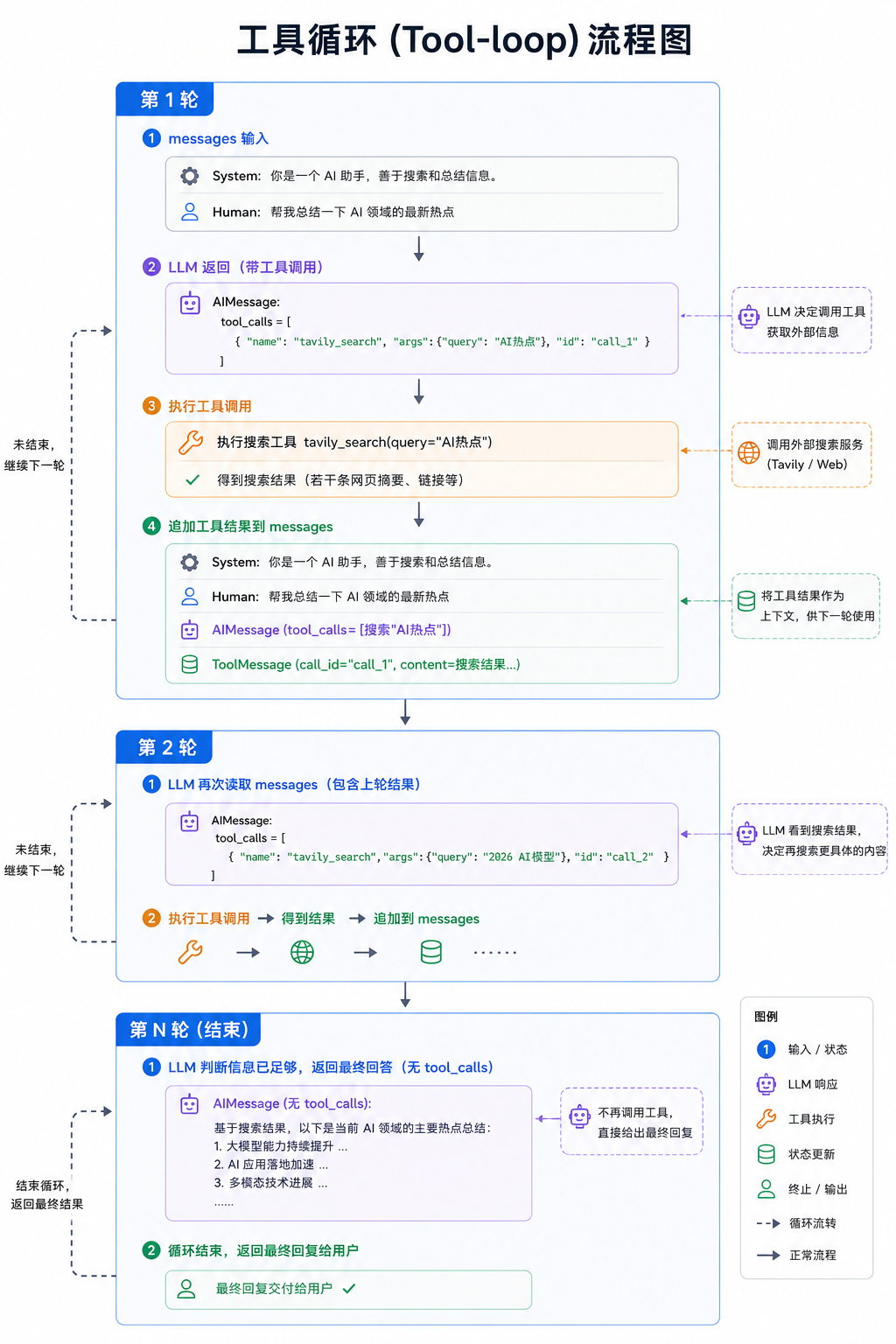
Why is tool_call_id needed?
When the model calls multiple tools at once, you need to know which tool_call each ToolMessage corresponds to.
tool_call_idis that pairing identifier. If an AIMessage has tool_calls but is not followed by corresponding ToolMessages, DeepSeek returns a 400 error. This is a pitfall I stepped into while developing PenFlow.
3. LangGraph Core Concepts
3.1 State: The Blood of the Graph
State is the shared data structure that runs through the whole graph; every node reads data from it and writes data to it.
PenFlow's State definition (graph.py):
from typing import Annotated
from typing_extensions import TypedDict
from langgraph.graph.message import add_messages

class State(TypedDict):
    messages: Annotated[list, add_messages]  # Conversation history
    account_position: str                     # Account positioning (user input)
    content_direction: str                    # Content direction (user input)
    topics: list                              # The 3 topics generated by the topic Agent
    selected_topic: str                       # The topic chosen by the user
    article: str                              # The article generated by the writing Agent
    formatted_article: str                    # The final formatted article
    next: str                                 # Routing target
Why use TypedDict instead of a plain dict?
# Plain dict has three problems:
state = {}
state["topics"] = ["Topic 1"]
state["topics"] = ["Topic 2"]  # Overwritten directly; the previous one is gone

# TypedDict + Reducer solves these problems:
# 1. Type checking: the framework knows each field's type and can validate at compile time
# 2. Reducer: declare a field's merge strategy via Annotated
# 3. IDE support: code completion and type hints
The secret of Annotated and Reducer:
In LangGraph, State is a shared state object (usually a TypedDict).
When multiple nodes (Node) write to the same state field, the default behavior is to overwrite (overwrite). But often we don't want overwriting, especially for messages (conversation history): we want to append (append) rather than overwrite. A Reducer is the function that defines "how this field should merge old and new data".
messages: Annotated[list, add_messages]
#         ─────────────  ────────────
#              Type         Reducer function
add_messages is a reducer function, which tells LangGraph: "when a node writes new content to messages, append rather than overwrite".
# Without a reducer (plain field):
state["article"] = "First draft"
state["article"] = "Second draft"  # Overwritten, only the latest value is kept ✓ (this is what we want)

# With the add_messages reducer:
state["messages"] = [msg1]
state["messages"] = [msg2]  # Appended, becomes [msg1, msg2] ✓ (conversation history needs to accumulate)
Design principles for State fields:
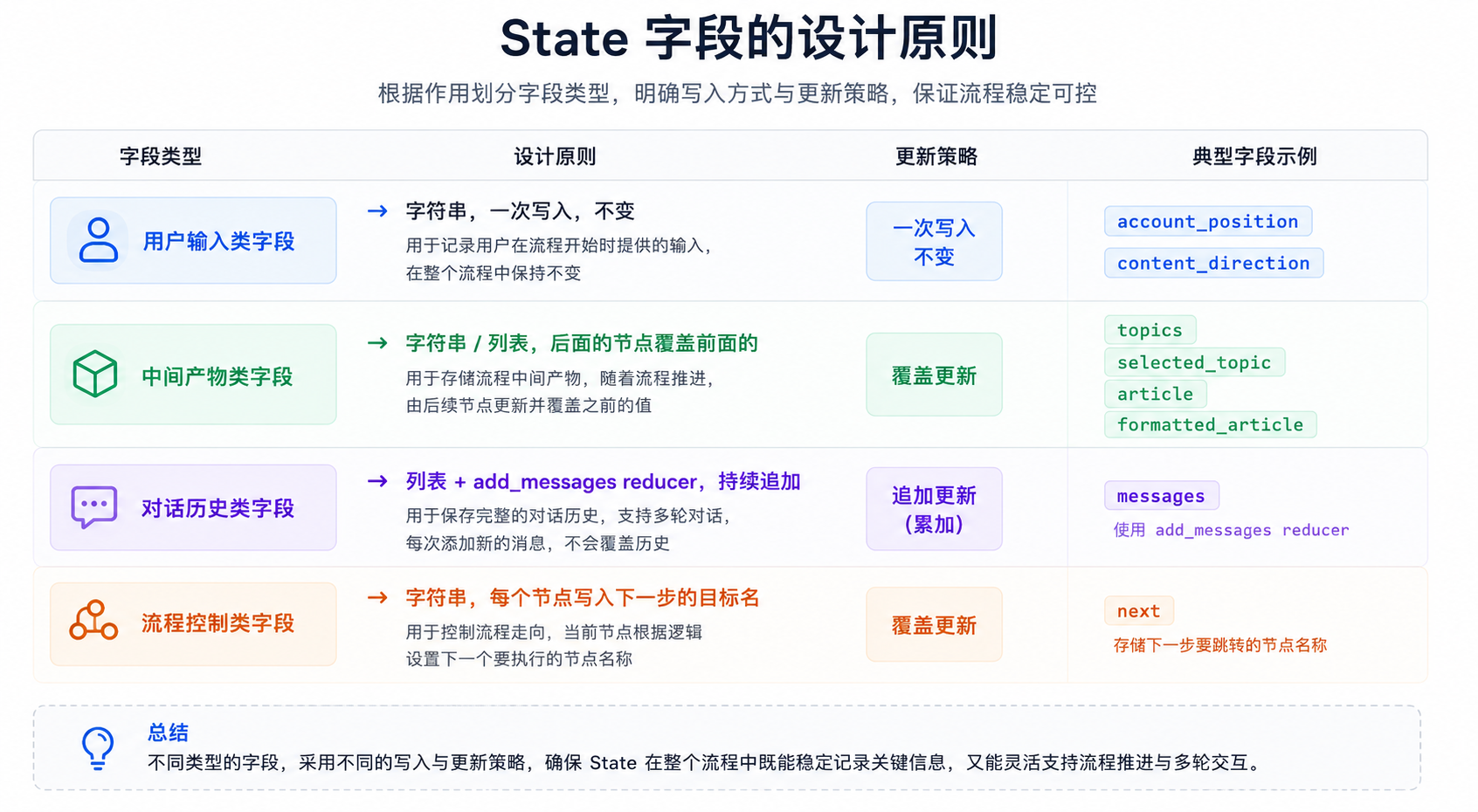
3.2 Node: The Organs of the Graph
A node is the processing unit in the graph, essentially just a Python function:
# Node function signature:
# Input: the current State
# Output: a partial update to the State (no need to return the complete State)

def writer_node(state: State) -> dict:
    article = write_something(state["selected_topic"])
    return {
        "article": article,    # Return only the fields that need updating
        "next": "format_agent" # Tell the framework where to go next
    }
PenFlow's four nodes:
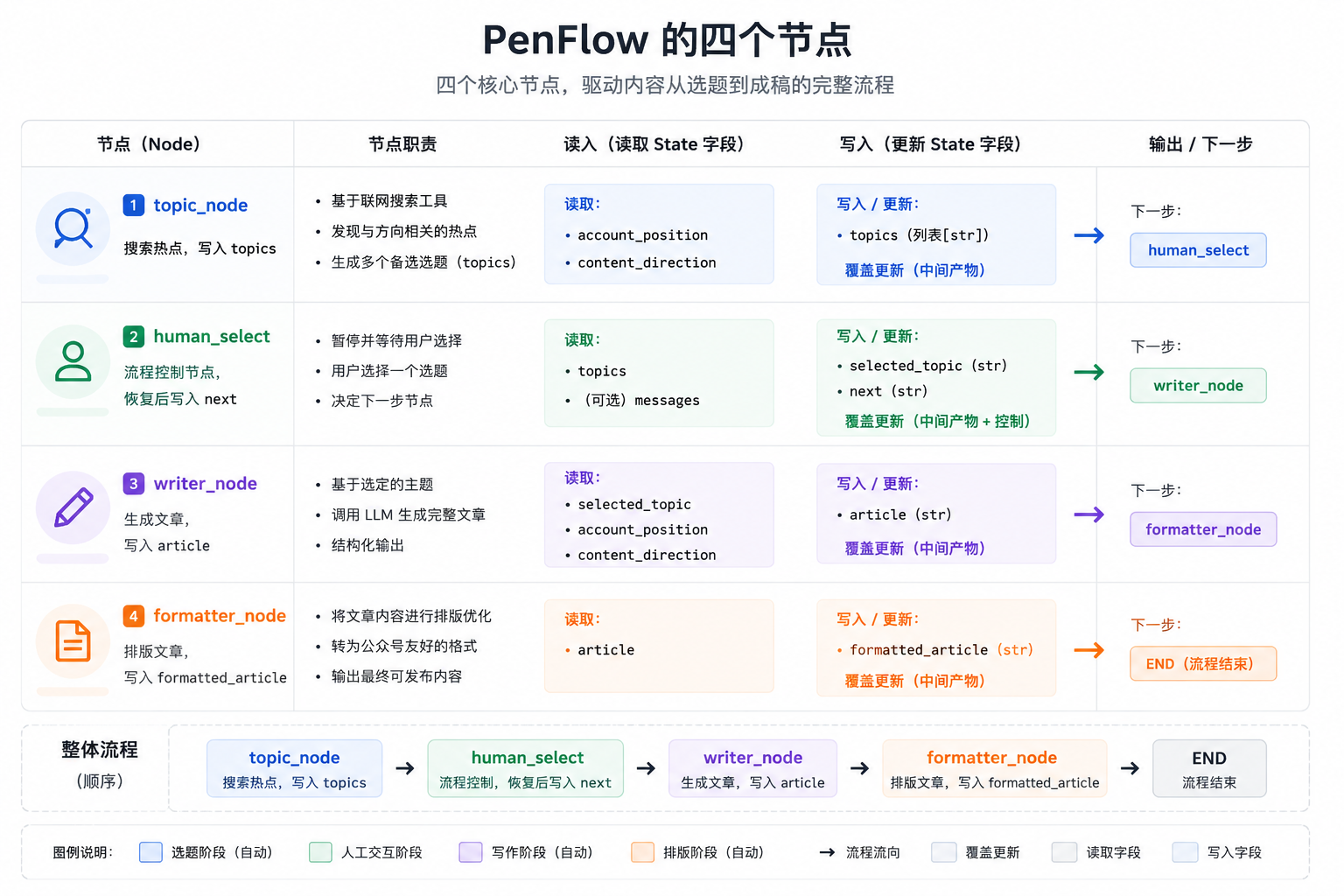
The factory function pattern (a design choice in PenFlow):
PenFlow's nodes are not defined directly as functions but generated through factory functions:
# Factory function pattern
def build_topic_agent(llm, tavily_key: str):
    # Initialize tools here (only once)
    search_tool = TavilySearch(tavily_api_key=tavily_key)
    llm_with_tools = llm.bind_tools([search_tool])

    # Return the real node function (a closure capturing the variables above)
    def topic_node(state: dict) -> dict:
        # Use the outer llm_with_tools and search_tool
        ...

    return topic_node  # Return the function, not the call result
Why use a factory function?
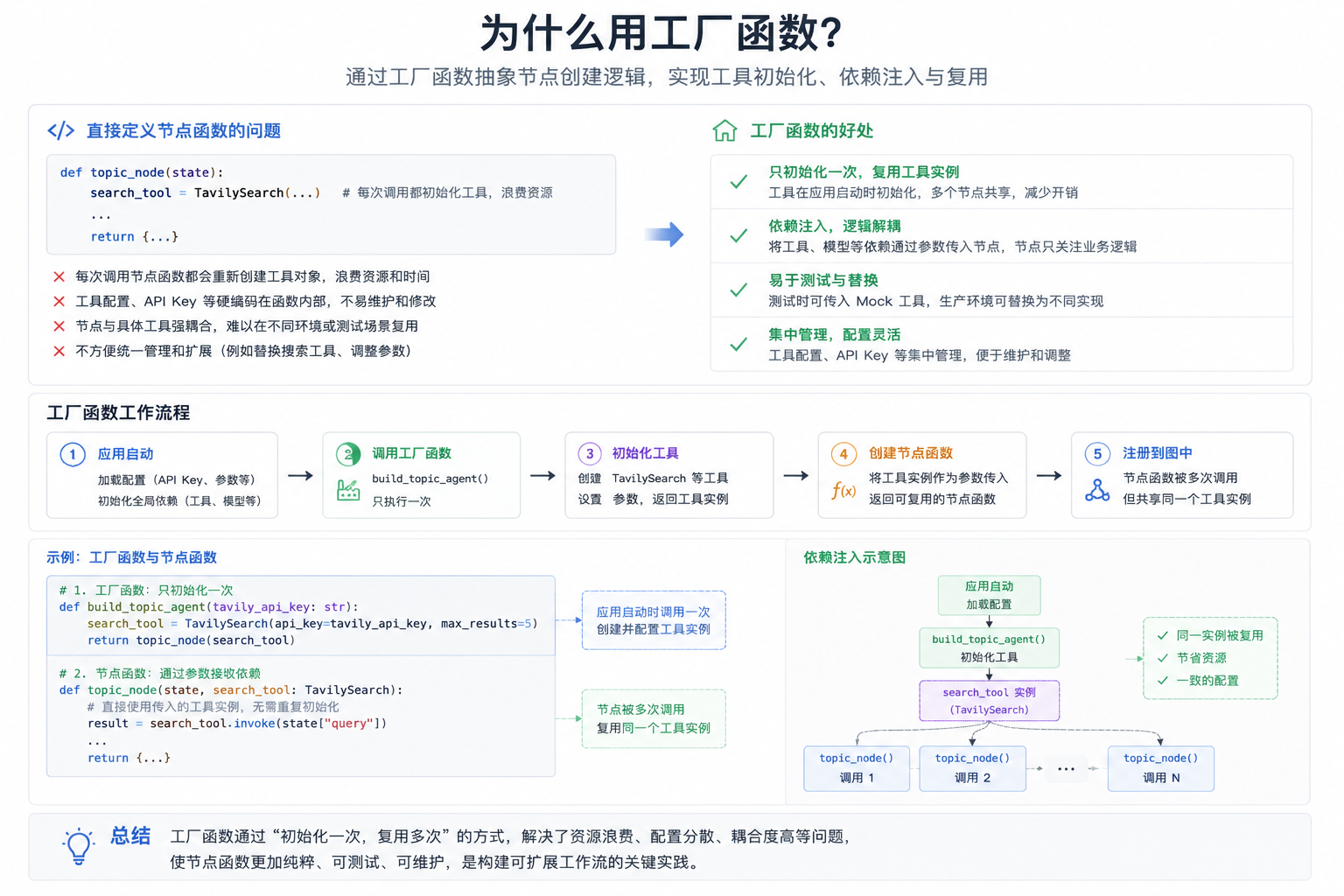
3.3 Edge: The Nerves of the Graph
An Edge defines the connections between nodes and decides the execution order.
Two kinds of edges:
# 1. Fixed edge: after A runs, always go to B
builder.add_edge("A", "B")

# 2. Conditional edge: after A runs, decide where to go based on a condition
builder.add_conditional_edges("A", router_fn, {
    "go_to_B": "B",
    "go_to_C": "C",
})
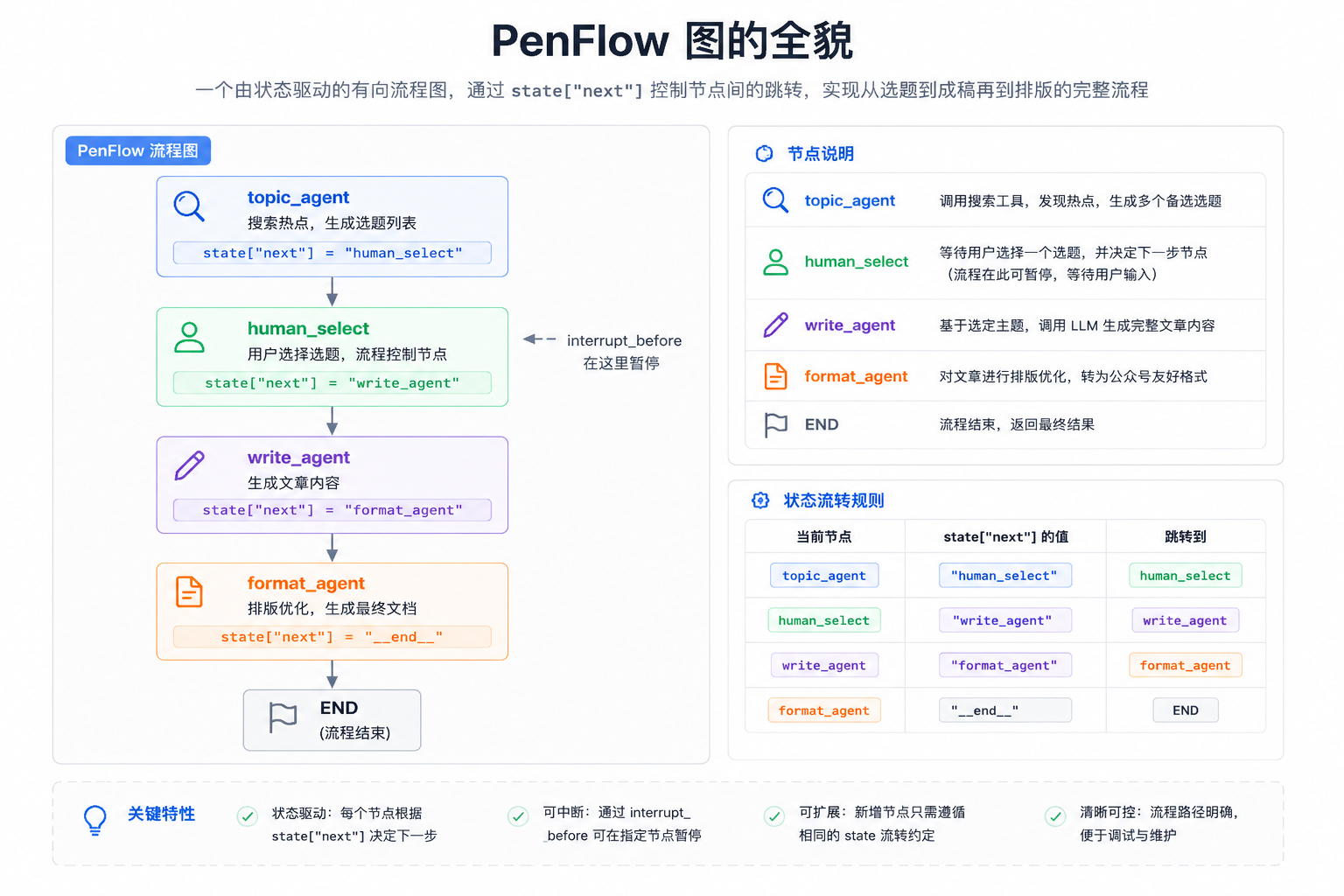
PenFlow uses only conditional edges:
builder.add_conditional_edges("topic_agent", router, {
    "human_select": "human_select",
    END: END
})
The router function here:
def router(state: State):
    return state.get("next", END)
    # Read state["next"] and return the name of the next node
So a node only needs to write the target name into state["next"], and the router will steer the flow there.
The whole picture of the graph:
3.4 Conditional Edge in Detail
The three parameters of add_conditional_edges:
builder.add_conditional_edges(
    "topic_agent",        # Parameter 1: which node to start from
    router,               # Parameter 2: the routing function, takes State and returns a string
    {                     # Parameter 3: a mapping table from the routing function's return value → the target node
        "human_select": "human_select",
        END: END
    }
)
Execution logic:
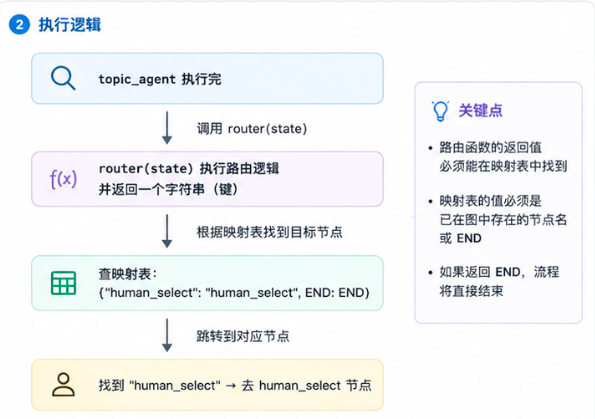
The role of the mapping table: the string a routing function returns doesn't have to match the node name; the mapping table provides a layer of decoupling. For example, you could do this:
# The routing function returns an internal status code
def router(state):
    if state["topics"]:
        return "has_topics"
    return "no_topics"

# The mapping table translates the status code into a node name
builder.add_conditional_edges("topic_agent", router, {
    "has_topics": "human_select",
    "no_topics": "topic_agent",   # No topics, so retry
})
3.5 Checkpointer: The Memory of the Graph
Checkpointer is LangGraph's persistence mechanism, responsible for saving a complete State snapshot after each node executes.
Usage in PenFlow:
from langgraph.checkpoint.memory import MemorySaver

memory = MemorySaver()
app = builder.compile(
    checkpointer=memory,
    interrupt_before=["human_select"]
)
thread_id: the address of the State
config = {"configurable": {"thread_id": "session_2026-05-10"}}

# First invoke: create a snapshot and store it in memory["session_2026-05-10"]
app.invoke(initial_state, config=config)

# Second invoke: load the snapshot from memory["session_2026-05-10"] and continue execution
app.invoke(None, config=config)
Different thread_id = different conversation = isolated State.
MemorySaver vs. other Checkpointers:
Checkpointer | Storage location | Use case |
|---|---|---|
| Memory | Development and testing; data disappears when the process ends |
| SQLite file | Single-machine production, persistent data |
| PostgreSQL | Multi-instance deployment, cloud production |
PenFlow currently uses MemorySaver, which suits the development and learning stage. After going live, you should consider switching to SqliteSaver or PostgresSaver.
3.6 Human-in-the-loop: Human-Machine Collaboration
This is the most central design of PenFlow, letting users take part in decisions within an automated flow.
Principle: use interrupt_before to pause before a specified node
app = builder.compile(
    checkpointer=memory,
    interrupt_before=["human_select"]  # Pause before executing human_select
)
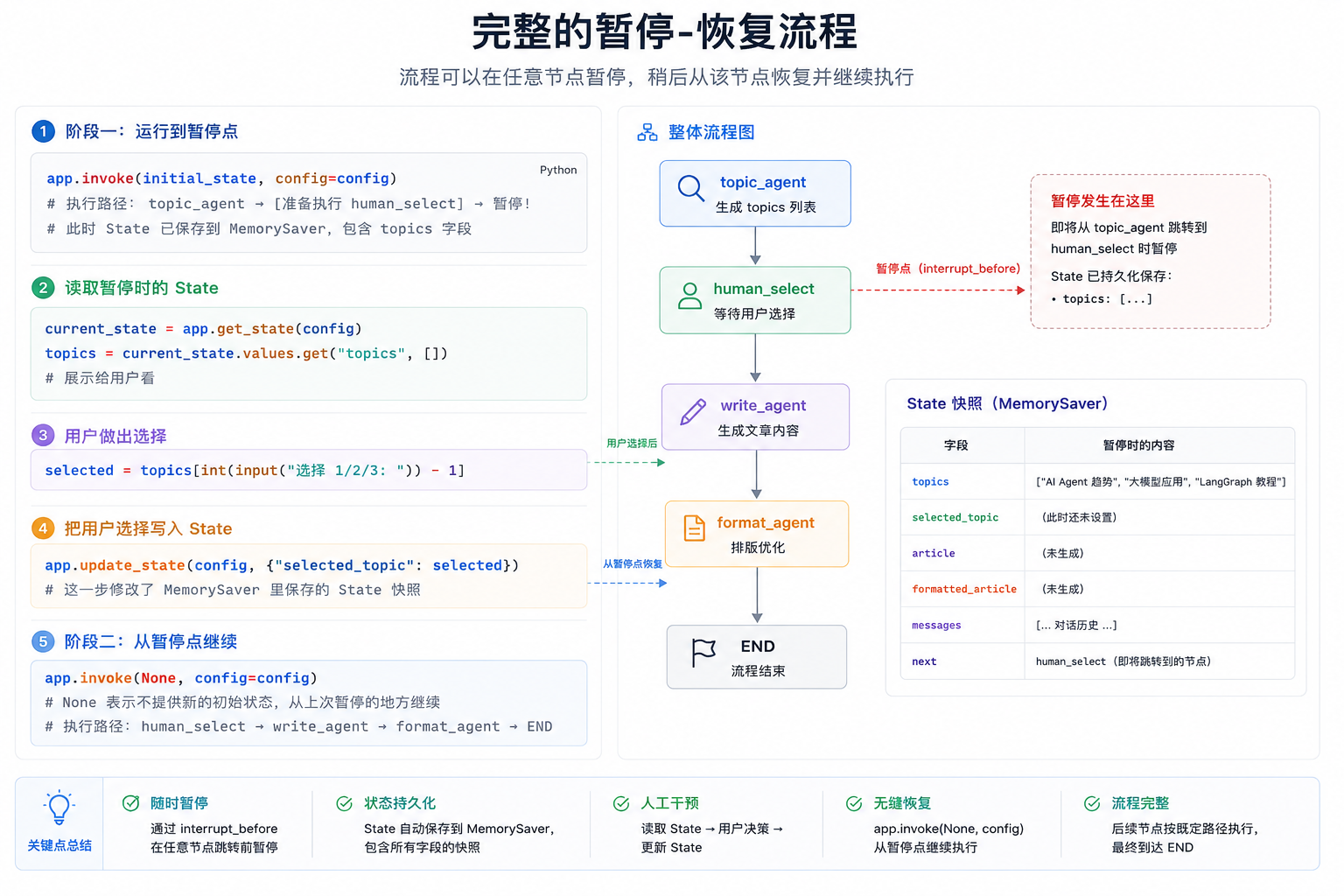
Why can app.invoke(None, ...) continue?
Because the Checkpointer remembers where the last execution stopped (before the human_select node), invoke(None) tells the framework: "find the breakpoint for this thread_id in memory and keep running."
What MemorySaver stores (simplified):
{
  "session_2026-05-10": {
    "state": {
      "topics": ["Topic 1", "Topic 2", "Topic 3"],
      "selected_topic": "Topic 1",  ← written by update_state
      ...
    },
    "next_node": "human_select",  ← continue from here
    "config": {...}
  }
}
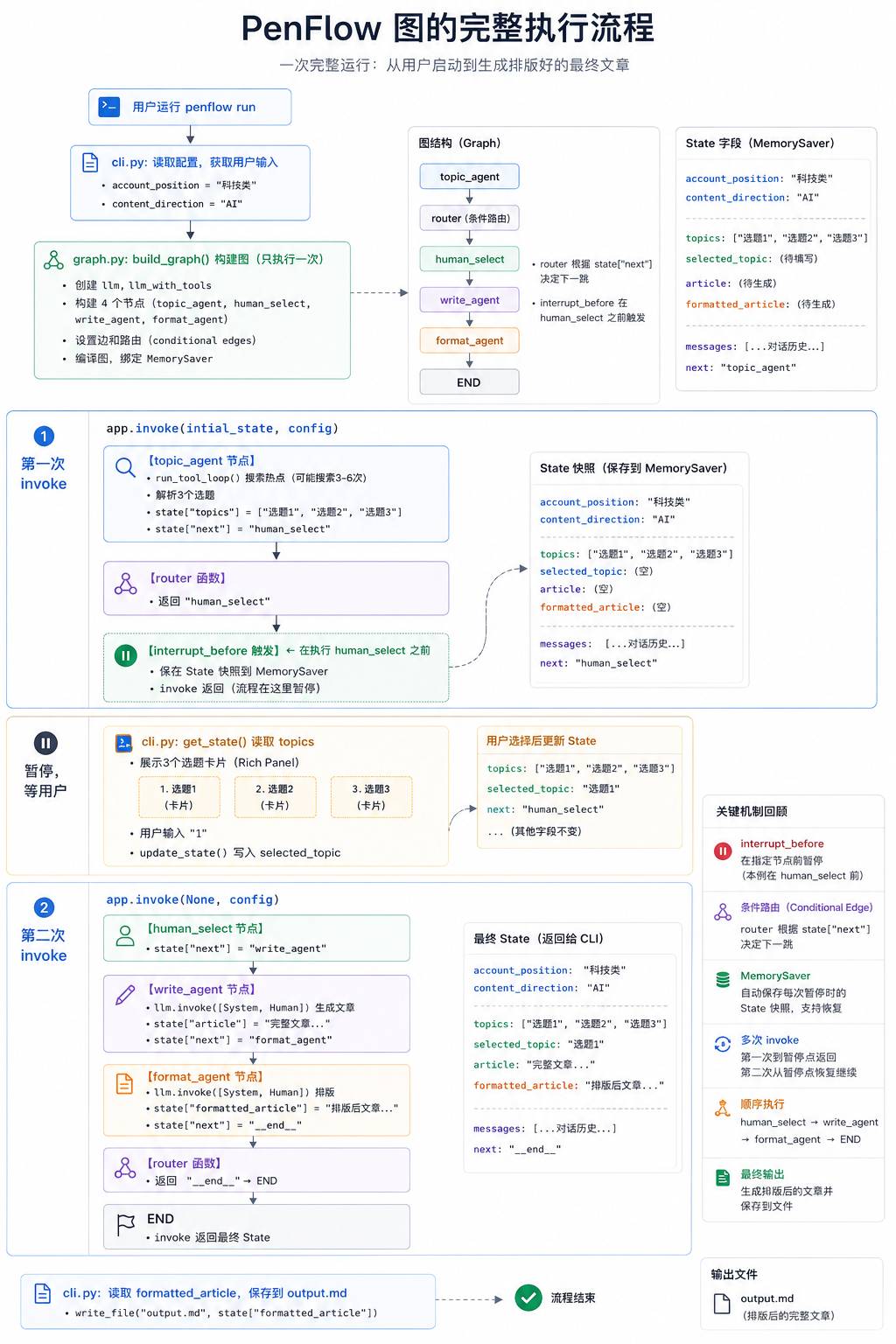
4. The Full Execution Flow of the PenFlow Graph
Tie all the concepts above together and look at one complete run:
5. Design Pattern Summary
Pattern 1: Factory Function Nodes
def build_xxx_agent(llm, api_key):
    # Initialize resources (runs only once)
    tool = SomeTool(api_key=api_key)
    llm_with_tools = llm.bind_tools([tool])

    def xxx_node(state):
        # Use resources (runs on every call)
        ...

    return xxx_node  # Return the function
Use case: when a node needs to initialize external resources (API clients, database connections, and so on).
Pattern 2: Routing via the next Field
# Write the routing target inside the node function
def some_node(state):
    return {"next": "target_node"}

# A unified routing function
def router(state):
    return state.get("next", END)

# All nodes share one routing function
builder.add_conditional_edges("node_a", router, mapping)
builder.add_conditional_edges("node_b", router, mapping)
Advantage: routing logic is centralized in the node functions, the graph structure is clear, and the routing function is minimal.
Pattern 3: Sub-Agent Tool Loop Isolation
def agent_node(state):
    # Internal tool loop, doesn't pollute the global State
    final_response = run_tool_loop(llm, tools, messages)

    # Only write the final result into State
    return {"article": final_response.content}
Key point: the intermediate process of tool calls (AIMessage with tool_calls + ToolMessages) is not written into the global State; only the final text result is written. Otherwise the next node sees unpaired tool_calls and raises an error.
References & Further Reading
Copyright
Copyright of this article belongs to its author or rights holder. When reposting or quoting, please follow the applicable license terms and keep the link to this article.
Link to this article: https://xuyi.dev/en/2026-05-11-2ixyfm