Article
No Memory in Your Clipboard? Clibo Helps You Remember Every Copy
Let me start with a personal pain point. During the stretch when OpenClaw was all the rage, quite a few people asked me to deploy "the lobster" for them remotely. Deployment needs a lot of information, so every time I set one up for a user, I might have to copy and paste a lot of info over to their computer again and again, or, not knowing where to put the content I'd copied and was about to use, I'd dump everything into WeChat's File Transfer Assistant and dig through it every time I needed something.
That was a very inefficient way to work, so that's when I came up with the idea of building a clipboard manager that records everything I've copied and sorts it by content type, so I can just open a panel, quickly find those copied items, and reuse them. And so Clibo went live, naturally enough.
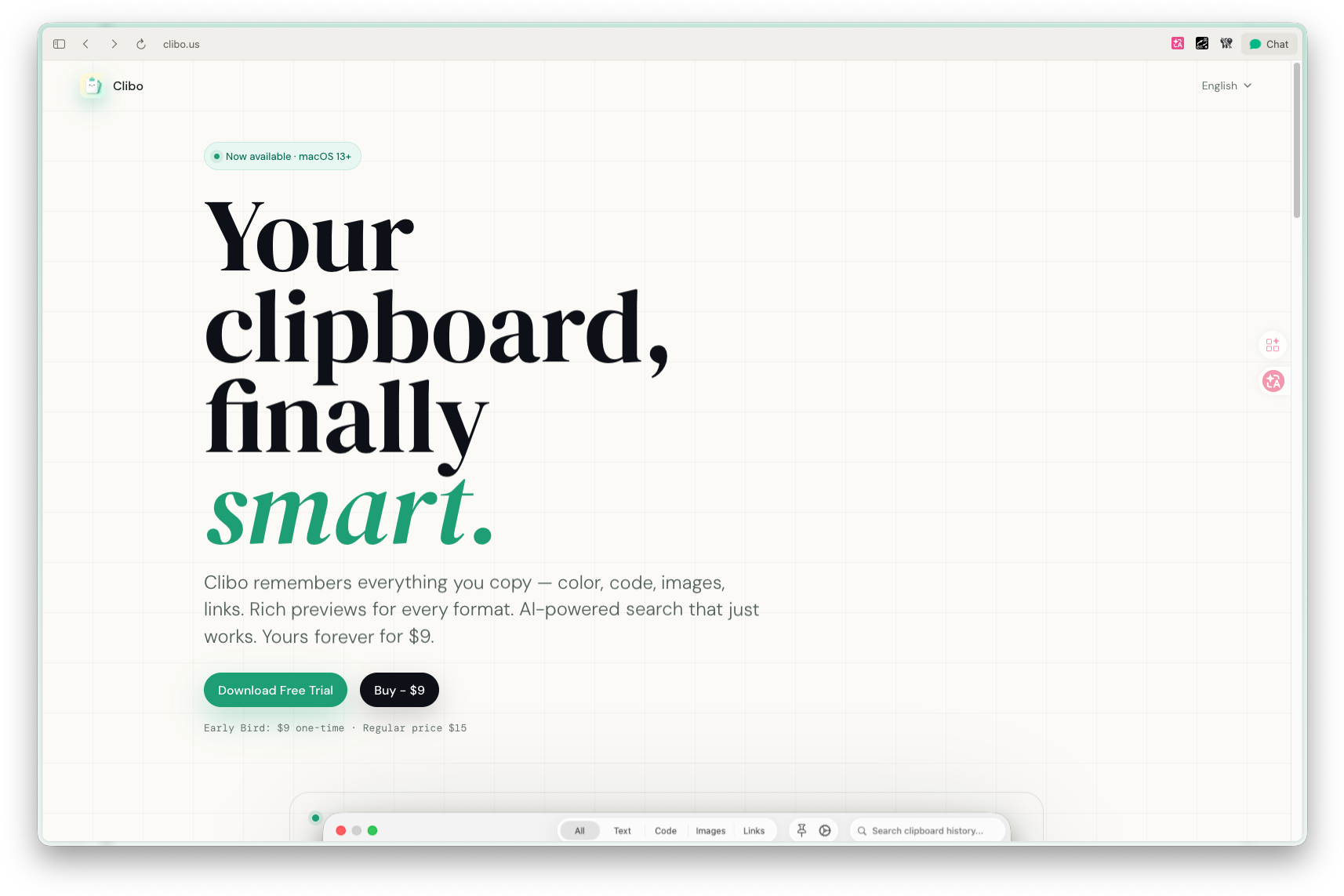
Because of how it's implemented and the App Store review requirements, after weighing things I finally chose to sell it directly on my own website, with an early-bird price of 15.
Copy and paste seems too basic.
So basic that many people won't install a dedicated tool for it, until one day you copy something new and discover that the important command, link, code snippet, or image path from a moment ago has already been overwritten.
This is the most counterintuitive thing about the clipboard: it moves things for you every day, but by default it has no memory.
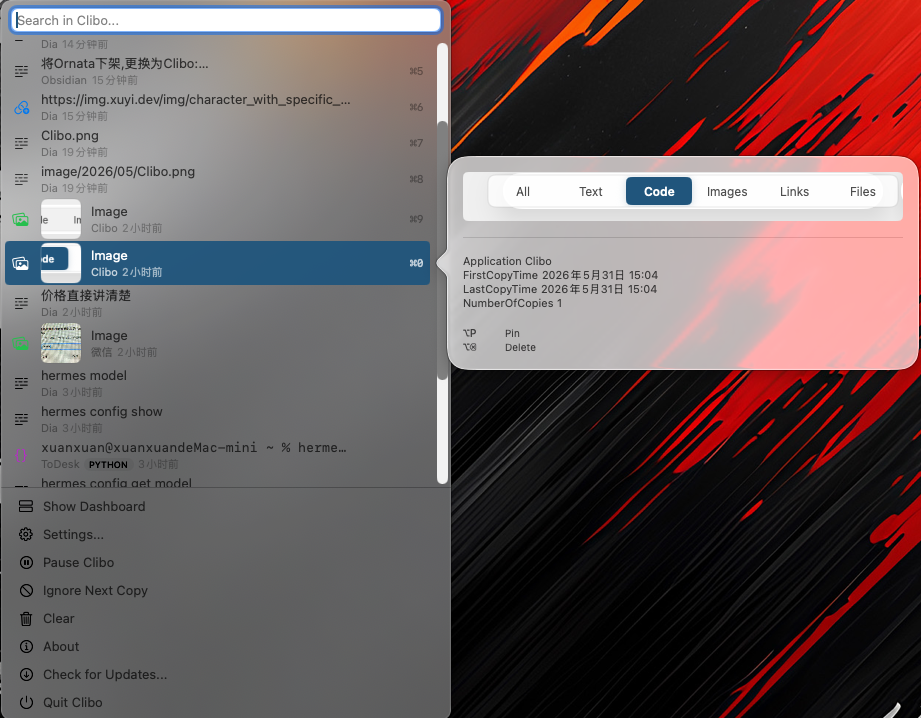
Clibo is a native macOS clipboard manager that lives in the menu bar and automatically saves clipboard history. It supports search, preview, pinning, and quick paste, and can connect to your own AI key for content processing and automation.
+
Why Build Another Clipboard Tool?
There are of course already clipboard tools on the market.
But I've never been quite satisfied with them.
Some tools are powerful but too heavy, like opening another workbench on your desktop; some are light but can only do the most basic history; and some have started going subscription, turning what is simply a high-frequency basic capability into a small bill you have to renew every month.
What I wanted was a different direction:
Lives in the menu bar, without demanding attention
Summons fast enough not to interrupt the current workflow
Search that's direct, so I don't have to scroll through a list
Images, links, files, and code should all be recognized
Privacy must be local-first
AI can enhance the experience, but must not become a barrier to use
In other words, Clibo isn't meant to be "the clipboard manager with the most features".
Its goal is simpler: to make what you've copied truly findable, usable, and processable.
Core Experience: If You Copied It, You Can Get It Back
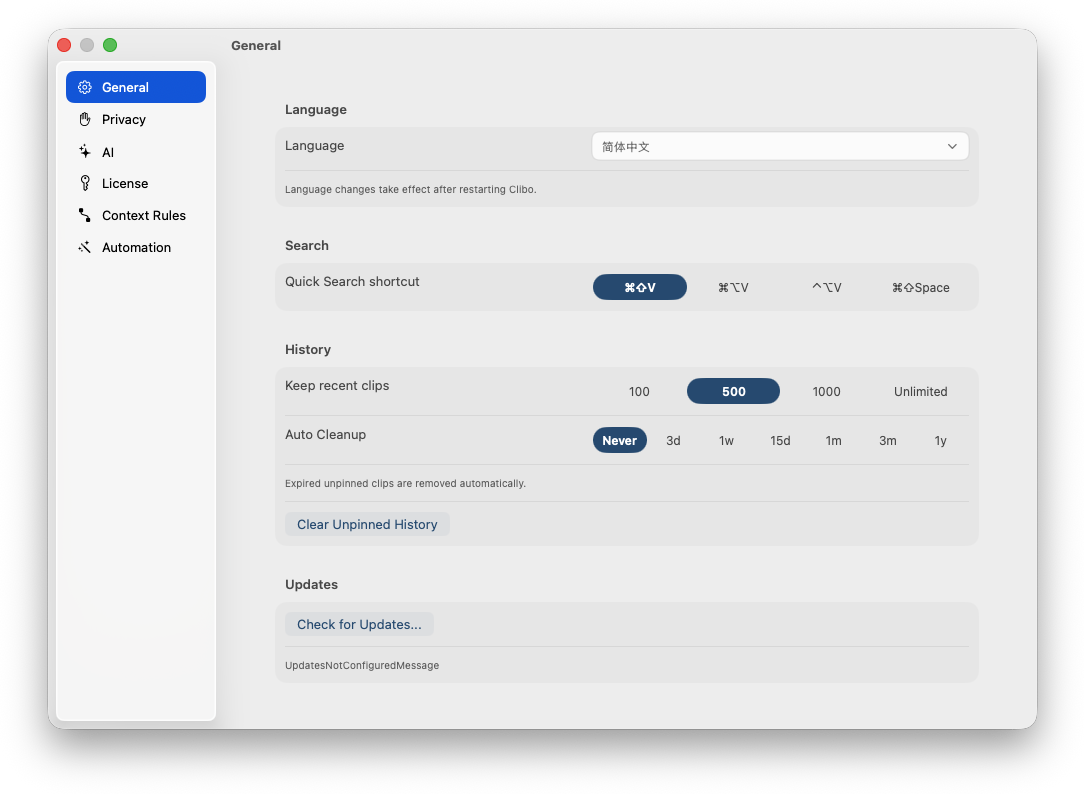
Clibo automatically watches the system clipboard and saves text, links, code, images, file paths, and more into a local history.
What's really useful isn't the act of "saving" itself, but whether you can quickly find it again afterward.
For example, suppose you just copied:
A terminal command
A JSON response from an API
A GitHub link
A screenshot
A local file path
A color value
A note meant to be sent to someone
In the system clipboard, only the last of these would originally still be alive.
In Clibo, they become records you can search, preview, and use again.
+
Quick Panel: Don't Leave Your Current Workflow
I don't like having to switch to another full window just to find one item of clipboard history.
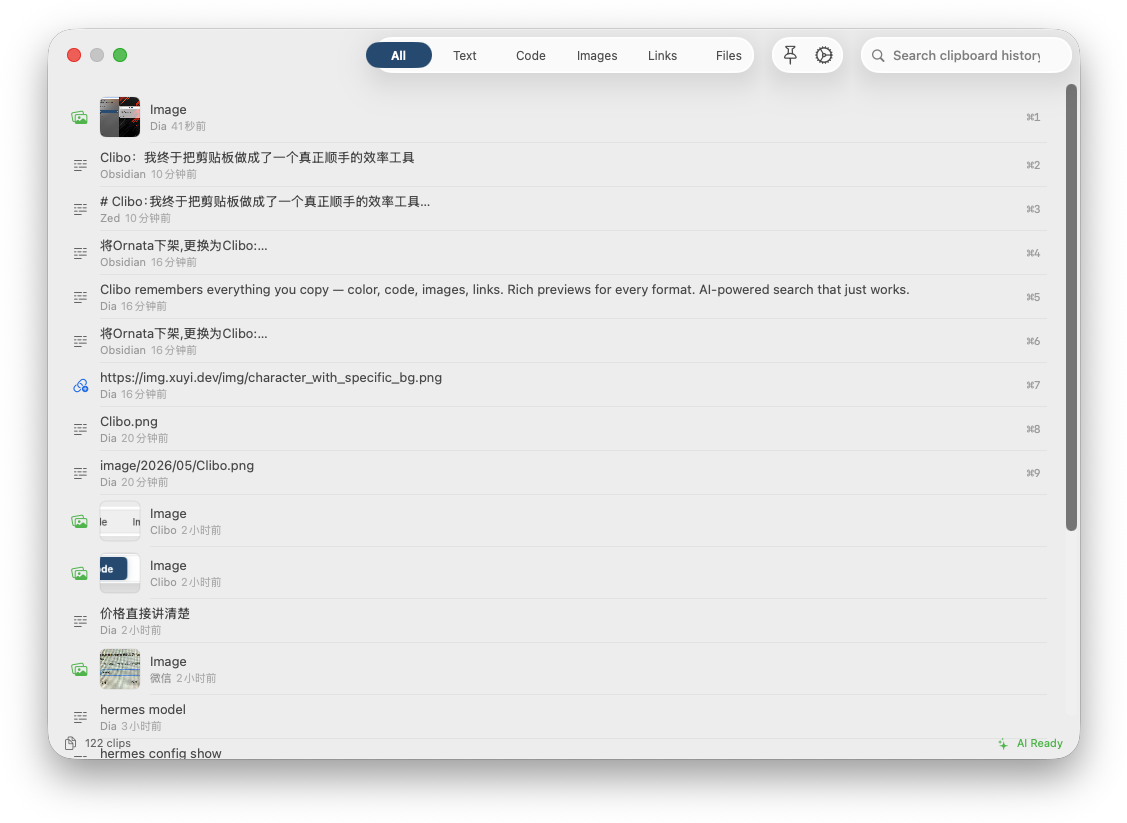
So Clibo has a quick search panel.
Summon it with a hotkey by default, type a keyword, pick a record, and press Enter to paste. The whole process should be as short as Spotlight, not like opening an admin back office.
The key here isn't whether the UI looks good, but that it must not interrupt what you're doing.
You might be writing code, editing a document, or replying to messages, and Clibo should only appear briefly, help you find what you need, and then vanish immediately.
I have a very simple standard for tools like this:
If a productivity tool itself requires a lot of actions, it has already started lowering productivity.
So Clibo's quick panel is designed mainly around these things:
Search as you type
Arrow keys to select
Enter to paste
Paste as plain text supported
Copy without pasting supported
Right-click actions supported
The main flow can be completed without a mouse
Type Recognition: The Clipboard Is More Than Text
Many clipboard tools treat content as text by default, which isn't nearly enough in developer scenarios.
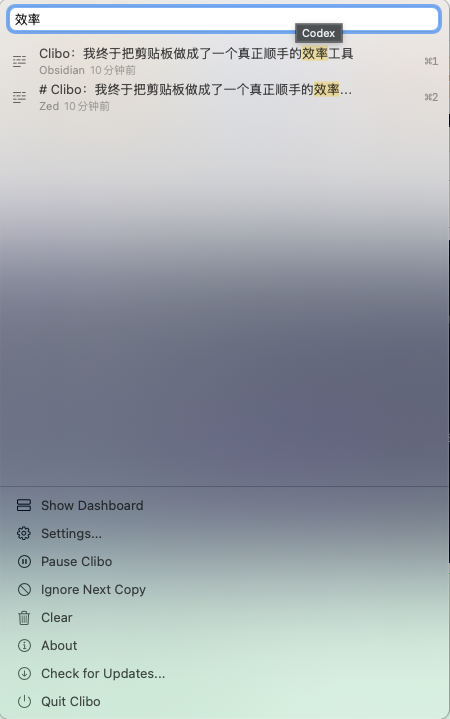
Clibo distinguishes different types:
Text: plain text
Code: code snippets
Images: images
Links: links
Files: files or paths
Pinned: pinned content
This looks like just categorization, but the actual experience differs a lot.
For example, links should be openable, images previewable, file paths locatable in Finder, code should show a language label, and color values should show a swatch that's easier to read.
I don't want users to rely on their memory every time to recall "what is this item". The tool should make that judgment itself.
This is also where Clibo will keep getting stronger: making clipboard history not just a list, but a set of understandable content objects.
Pinning: Frequently Used Content Shouldn't Get Washed Away by History
Some content isn't "history" but an "asset".
For example:
Frequently used SQL
Frequently used commands
Frequently used reply templates
Project paths
API addresses
Config snippets
Color values
If this kind of content gets pushed down every time something new is copied, it's really annoying.
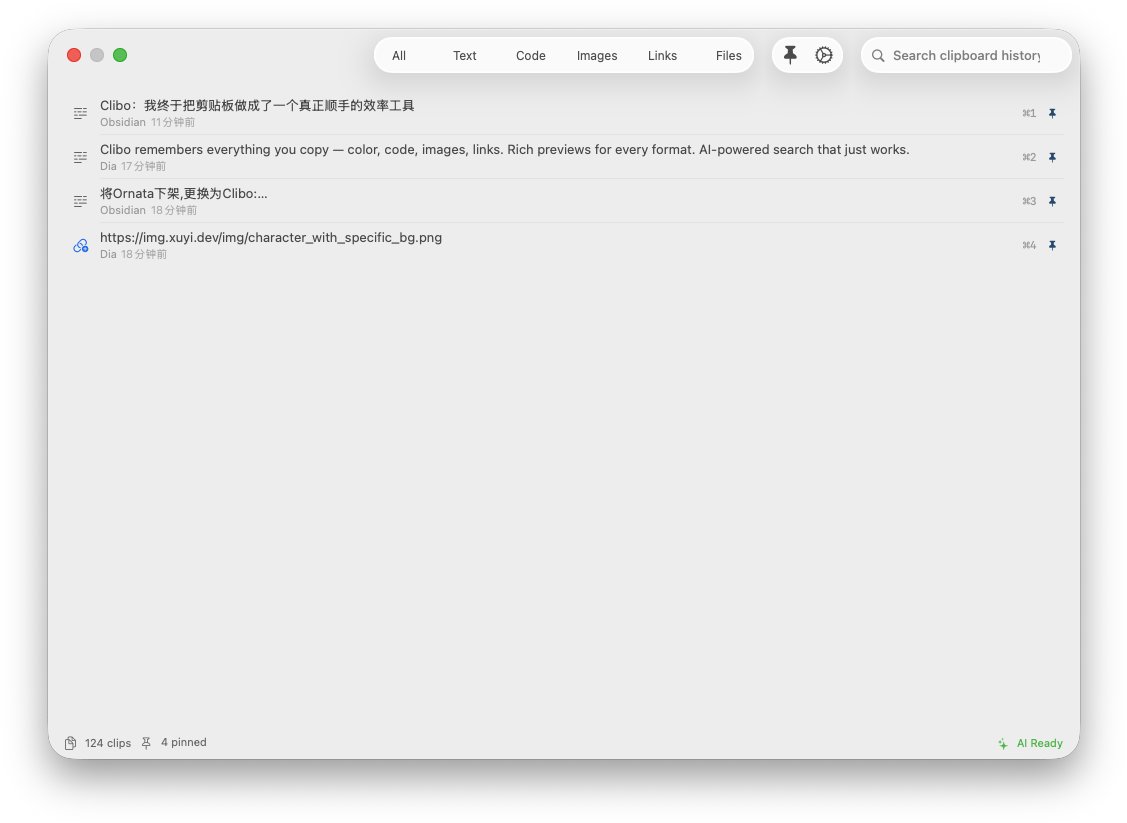
Clibo supports Pin. Pinned content stays fixed at the top of the list and isn't affected by the history retention limit.
+
It's not a complex feature, but it's very practical.
The problem with many tools is that they like to build big features first and ignore the small frictions that trigger every day. For a truly high-frequency tool, the experience is often not held up by one dazzling feature, but by a pile of small places that don't annoy you.
AI: Not a Chat Box, but Clipboard Actions
I didn't want to stuff "yet another AI Chat" into Clibo.
Because AI in a clipboard scenario shouldn't make users reorganize their question.
You've already copied something, and the most natural next actions are:
Translate
Summarize
Rewrite more formally
Rewrite more concisely
Fix formatting
Extract links
Extract colors
Custom Prompt
So Clibo's AI Actions are designed around clipboard entries.
Select a record, right-click and choose an AI Action, or use the default quick actions, and you can process that content directly.
+
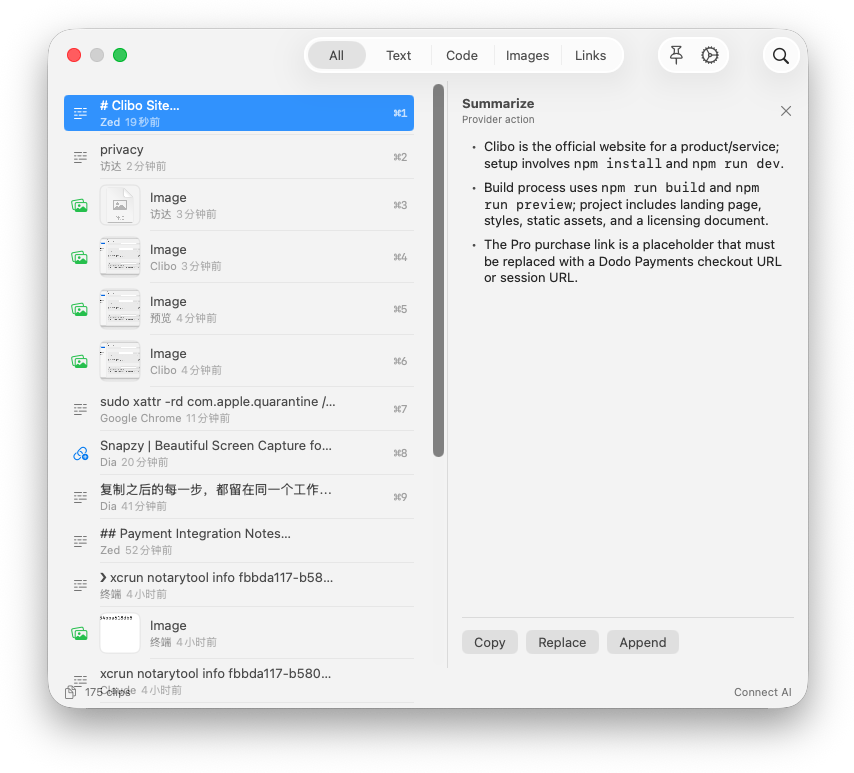
This is where AI sits reasonably in a productivity tool:
Don't make me "go ask the AI"; let me run an action directly on the current content.
Clibo supports BYOK, that is, Bring Your Own Key.
You can configure your own provider, such as OpenAI, Anthropic, Gemini, DeepSeek, or Ollama. The API key is stored in the macOS Keychain, AI requests go straight to the provider you configured, and Clibo does no server relaying.
This matters.
Sensitive content often appears in the clipboard: code, endpoints, internal documents, customer information, temporary passwords, licenses, debug logs. If a clipboard tool uploaded content to its own servers by default, I would be very wary.
Clibo's principles are:
Clipboard history is stored on the local machine
API keys are stored in the system keychain
AI requests go directly to the provider the user configured
No backend relay of its own
No telemetry uploads
Privacy: A Clipboard Tool Must First Learn Restraint
A clipboard manager has a natural risk: it's too easy for it to record what it shouldn't.
So Clibo has privacy filtering.
You can configure apps that are never recorded, such as password managers, browser private-browsing scenarios, and certain internal tools. You can also configure sensitive clipboard types and regex rules so specific content is skipped outright.
+
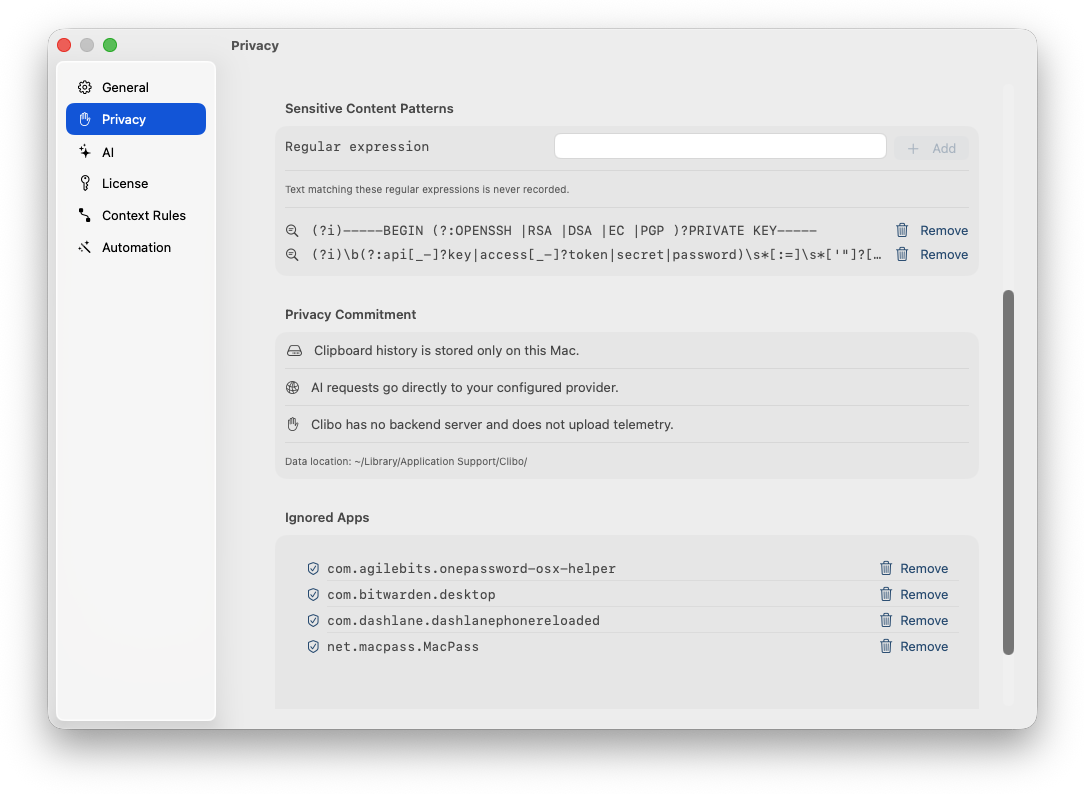
This isn't icing on the cake but a basic capability.
A clipboard tool that only records desperately is actually irresponsible.
Developers especially often copy:
Token
Cookie
Private keys
Database connection strings
Internal API addresses
One-time verification codes
Fragments of user data
Not everything that's been copied is worth remembering.
Clibo's goal isn't to "record everything", but to "record what should be recorded".
Context Rules and Automation: Letting the Clipboard Understand the Current Scenario
Clibo also has two more advanced capabilities: Context Rules and Automation.
Context Rules can set a default AI action for different apps.
For example, if you copy some English in the browser, the default action might be translate; if you copy some code in Xcode, the default might be fix formatting or tag the language; if you copy a long passage in a writing tool, the default might be summarize or rewrite.
Automation is more like a local rules engine.
You can trigger actions based on what's copied, for example:
Automatically extract the title after detecting a URL
Tag the language after detecting code
Automatically translate after detecting an English paragraph
Automatically pin when conditions are met
Send a notification after a rule matches
I don't want to hype it up as some kind of "Agent system" for now.
More accurately, it's an early form of local automation in the clipboard scenario.
The truly valuable part is that it doesn't leave AI hovering outside the app, but connects AI to your act of copying.
Copying is, after all, an action with strong intent.
When a user copies something, it often means they're about to use, organize, forward, rewrite, save, or analyze it. What Clibo does is catch those follow-up actions.
Some Implementation Trade-offs
Clibo is a native macOS app.
The core storage currently uses SQLite, saving clipboard records locally and using FTS for full-text search. The menu bar, Dashboard, and Quick Search panel are all kept as light as possible, without a heavy window presence.
There are a few things I care about in the implementation:
A clipboard tool is a high-frequency tool, not a low-frequency management system.
The first requirement of a high-frequency tool is speed. No matter how pretty the interface is, if it's half a beat slow every time you open it, users will abandon it without thinking.
Without an AI key configured, Clibo should still be a complete, usable clipboard tool.
AI is a bonus, not a startup requirement.
If you build a clipboard tool, you have to take privacy seriously.
Local storage, Keychain, configurable ignore rules, and no backend relay are not marketing points but the bottom line this kind of tool should have.
Recently I've also been adjusting some of Clibo's interaction animations, such as segmented-control switching and dropdown expansion.
The lesson learned the hard way: more animation isn't better. Especially on a platform like macOS, which already has the feel of system controls, custom-drawn controls that aren't handled well easily give a cheap feeling of "two layers of UI stacked together".
The right direction should be: animation serves only state changes and doesn't steal attention.
Who Is Clibo For?
If you only copy and paste occasionally, the system clipboard is enough.
But if you handle lots of text, code, links, images, and paths every day, Clibo will noticeably reduce that anxiety of "where did the thing I just copied go".
I think it's especially suited to:
Developers
Writers
Product managers
Designers
Users with research-style workflows
People who often shuttle content between multiple apps
Simply put, if you copy and paste dozens of times a day or more, clipboard history isn't an optional feature.
It's your second working memory.
Finally
Clibo's core idea is actually very simple:
Every copy deserves to be remembered, but not every copy should be interrupted.
So it won't try to become a heavy productivity platform, and it won't force AI into a do-everything entry point.
It simply stands beside the high-frequency action of copy and paste, finds the lost history, compresses repetitive operations, and hands content that can be processed automatically over to rules or AI.
This is the clipboard tool I wanted.
A bit lighter, a bit faster, a bit smarter, and a bit more restrained.
+
+
Copyright
Copyright of this article belongs to its author or rights holder. When reposting or quoting, please follow the applicable license terms and keep the link to this article.
Link to this article: https://xuyi.dev/en/2026-05-31-m0-abq